Ethan Carter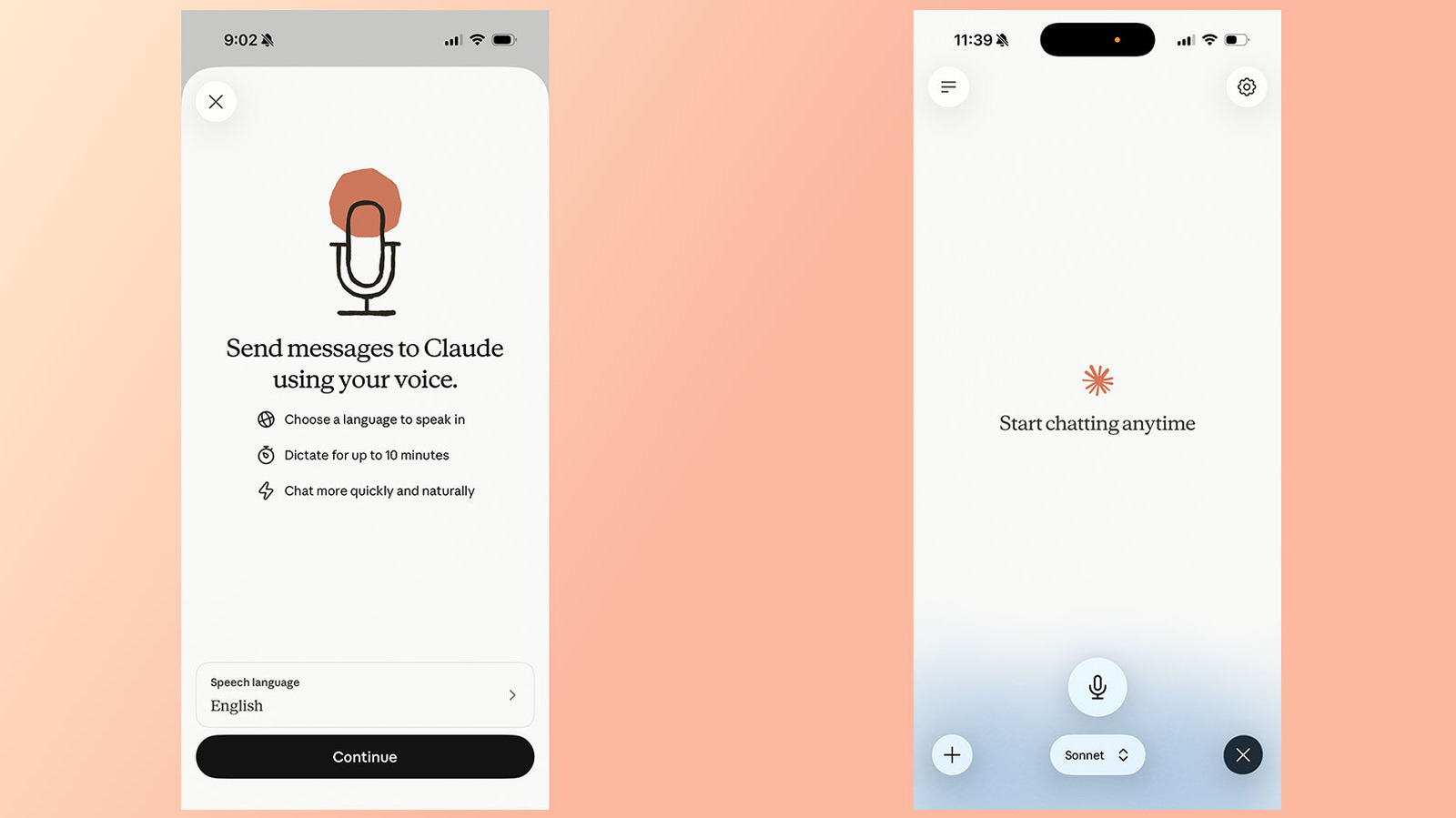

Anthropic’s chatbot has a dynamic voice mode that you can activate for a more interactive experience.
Since its launch in 2025, Anthropic has introduced a voice mode for its chatbot, Claude, enabling users to communicate verbally rather than typing prompts. This feature received a significant update in July 2026, enhancing its functionality. Initially, voice mode was restricted to Haiku, Anthropic’s less powerful model, primarily to minimize latency. Now, users can utilize voice mode with the more advanced models, Sonnet and Opus, allowing Claude to draw context from integrated apps and services.
If you’re a regular user of Claude and wish to experience this feature, follow the steps below.
Steps to Activate Claude’s Voice Mode
Igor Bonifacic for Engadget
You can access voice mode through the Claude mobile apps (available for Android and iOS), desktop applications, or the web platform. Anthropic recommends using the mobile app for the best experience.
To activate voice mode on your mobile device:
-
Launch the Claude app.
-
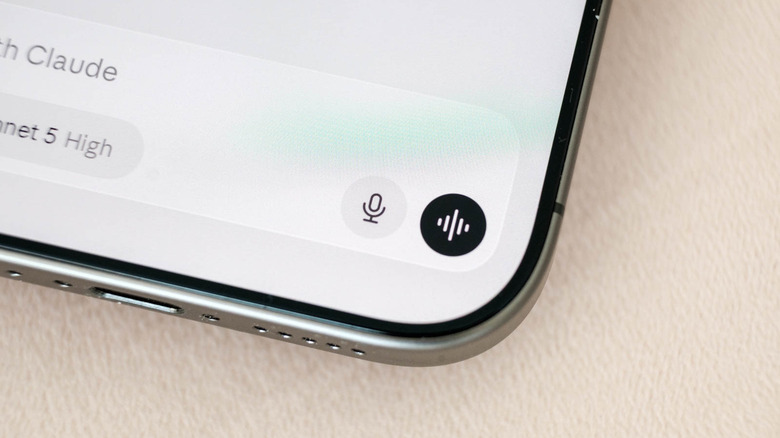
Select the black waveform icon located in the bottom right corner of the screen (not the microphone icon adjacent to it).
-
If prompted, allow the app to access your microphone.
-
Begin speaking. Claude will respond once you complete your prompt.
-
Claude will stay in voice mode until you tap Stop.
It’s important to note that Claude’s voice mode operates on a “turn-based” system. This means the chatbot listens to your input before generating a response. This differs from ChatGPT’s recent upgrade to a “duplex” system, which allows simultaneous speech processing and output generation.
As a result, voice mode may misinterpret brief pauses as the end of a question or prompt. To avoid confusion, Anthropic advises users to ask multi-part questions sequentially rather than all at once.
How to Choose Between Different Models
 Igor Bonifacic for Engadget
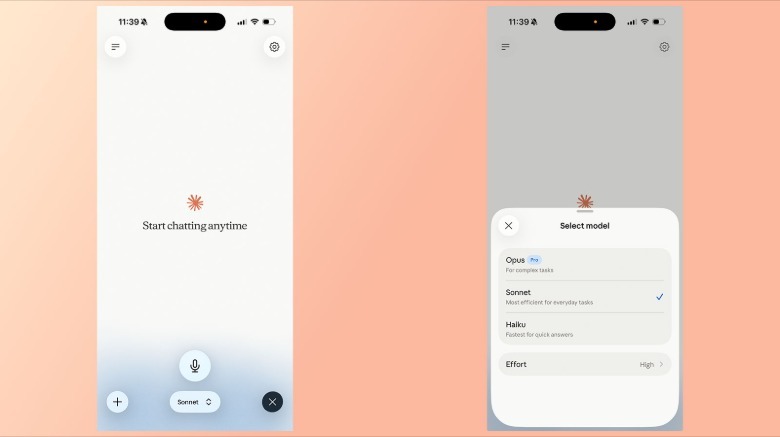
You can select the model Claude uses to generate responses via the model picker at the bottom of the interface. Below is a list of available models along with brief descriptions provided by Anthropic:
-
Haiku: Fastest for quick responses
-
Sonnet: Most effective for daily tasks
-
Opus: Ideal for complex tasks. Available only to paid subscribers.
Using Claude with Integrated Apps
Similar to text chat, voice mode can interact with apps and services connected to Claude, including Gmail, Google Calendar, and Slack. For instance, you can instruct Claude to summarize recent emails by specifying the app you want to utilize in your prompt. When accessing a third-party app for the first time, you must grant Claude the necessary permissions.
Adjusting Claude’s Voice and Language Preferences
Igor Bonifacic for Engadget
As of July 2026, Anthropic supports Voice Mode in 14 languages, including various dialects. The selected language will influence your choice of Claude’s voice. For example, English offers five voice options, while Japanese provides only two. Below is the complete list of languages supported by Voice Mode:
-
English
-
English (India)
-
English (United Kingdom)
-
Chinese (Simplified)
-
Cantonese
-
French
-
French (Canada)
-
German
-
German (Austria)
-
Hindi
-
Italian
-
Japanese
-
Korean
-
Portuguese
-
Portuguese (Brazil)
-
Portuguese (Portugal)
-
Russian
-
Spanish
-
Spanish (Latin America)
-
Turkish
-
Ukrainian
One limitation of Voice Mode is its inability to detect language switches mid-sentence. If you intend to switch languages, clearly state your intention before speaking, or adjust Claude’s language via the Settings menu.
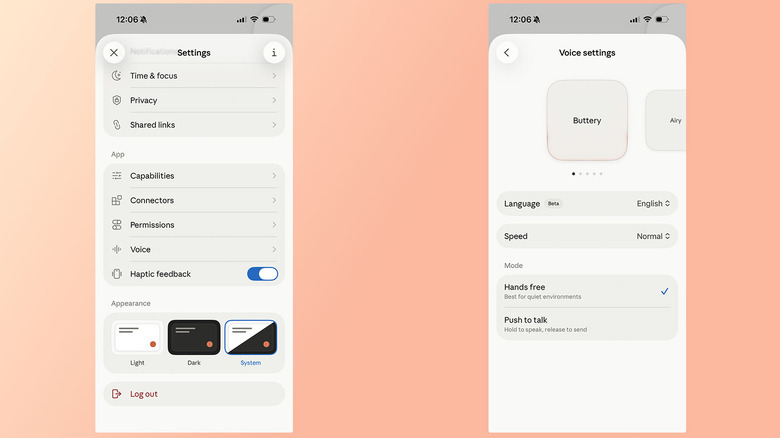
To modify Claude’s voice and language settings, navigate to the Settings section and select Voice (located below the App section). You can preview different voices by swiping through the options available. In English, the voice options include:
-
Buttery
-
Airy
-
Mellow
-
Glassy
-
Rounded
You can customize Claude’s speaking speed with options for Slow, Normal, and Fast. Lastly, Anthropic provides two recording methods for your prompts: Hands-Free and Push-to-Talk. The Hands-Free option is recommended for quieter settings.
Is a Paid Subscription Necessary for Claude’s Voice Feature?
Igor Bonifacic for Engadget
A paid Pro or Max subscription is not required to utilize Claude’s voice feature. users with free accounts are limited to the Haiku and Sonnet models. For most tasks, Sonnet should provide sufficient capability. To access the more advanced Opus model, a paid subscription is necessary. Keep in mind that conversations in voice mode contribute to your usage limits.
Free accounts are restricted to a single connection, but users can still utilize all currently supported languages.

 Daniel Mercer
 David Bridges