 David Bridges


Google Unveils Motion Assist: A Solution for Motion Sickness in Vehicles
If you often experience motion sickness while traveling in a car, using your phone may not be the best remedy. Google has introduced an innovative feature called Motion Assist that aims to enhance your experience. This new functionality helps Android users scroll through their devices with less discomfort when they are in motion.
While this technology is not entirely new—Apple introduced its version with iOS 18 back in 2024—Android users can now take advantage of it as well. Motion Assist is available on devices running Android 17 and above, along with the latest Google Play Services. Those who own the new Pixel 11 models can easily experiment with this feature. Samsung users will need to ensure their devices are operating on One UI 9.
This guide will walk you through the steps to enable and customize Motion Assist on Pixel devices. If your phone is from a different brand, menu options may differ. A quick search for “Motion Assist” in the settings might be the easiest way to locate this feature.
What Benefits Does Motion Assist Provide for Motion Sickness?

Pornpak Khunatorn/Getty Images
Motion sickness arises from conflicting signals sent to the brain by the body’s sensory systems. When you travel in a car, your inner ear detects every turn and stop, signaling movement. If your gaze is fixed on a still screen, your brain receives contradictory information, creating a sense of imbalance.
This dissonance often leads to feelings of nausea, which is precisely what Google’s Motion Assist aims to mitigate.
The feature utilizes your device’s motion sensors to adjust small visual elements on your screen in accordance with the vehicle’s movements. Google explains that this synchronization helps “your brain align what your eyes perceive with what your body experiences.” The moving shapes are designed to remain at the edges of the display, ensuring that the content you’re viewing in the center remains clear. It’s important to note that this feature is intended for use by passengers only, so drivers should refrain from using it while operating a vehicle.
How Can You Activate and Customize Android’s Motion Assist Feature?
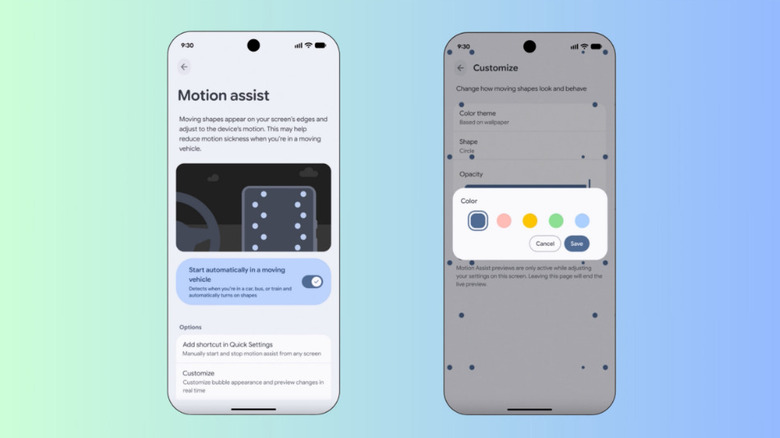
Screenshots by Yoni Yardeni (Google)
Activating Motion Assist is straightforward. On your Pixel device, open the Settings app, tap on your profile, and select All services. You can toggle the Motion Assist feature from the Personal & device safety menu.
To enhance your experience and prevent motion sickness during future travels, adjust your settings to automatically enable Motion Assist when your device detects movement. Within the Motion Assist settings, simply select Start automatically in a moving vehicle. Keep in mind that your phone’s sensors may struggle to accurately determine when you’re in motion, so Google suggests adding Motion Assist to your Quick Settings menu for easy access with just a few taps.
Similar to Apple’s Vehicle Motion Cues, Google offers customization options for the colors, opacity, and shapes displayed when Motion Assist is active. You can explore these options in the Customize menu found within the Motion Assist settings. there is a Randomization feature that alters the colors and shapes during use, adding a unique touch to your experience.


 Daniel Mercer