

 David Bridges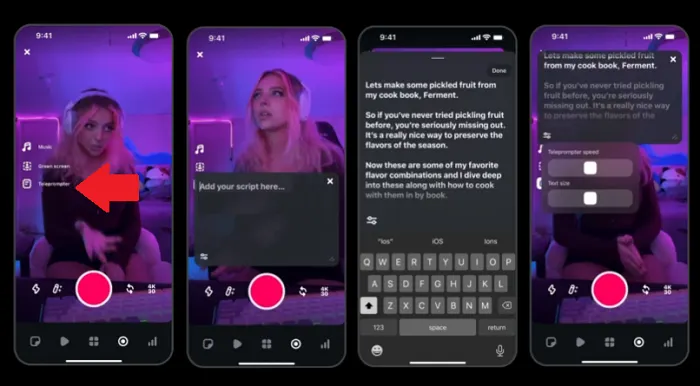

The latest enhancements to Instagram’s Edits video editing application are rolling out, and now every user has access to the innovative teleprompter tool. This feature was recently spotted during testing, and it’s designed to streamline your video production process.
The new teleprompter feature integrated into Edits allows users to effortlessly upload their scripts, which then display as rolling text on-screen. This functionality ensures that your text appears directly below the front-facing camera on your device, making it easier for you to maintain eye contact with your audience while delivering your message.
This innovative approach can significantly enhance the natural flow of your videos, allowing for a more engaging presentation style. Instead of memorizing lines or glancing off to the side, you can now film yourself addressing the camera directly, with the script conveniently positioned for optimal audience engagement.
Furthermore, as illustrated in the preceding frame, users have the flexibility to adjust the scrolling speed of the text as well as modify its size, ensuring that it fits perfectly with their speaking pace and personal style.
This teleprompter feature is a valuable addition that could significantly assist in producing more polished and professional content. Research indicates that incorporating a human presence in videos tends to boost viewer engagement, making this tool an essential consideration for anyone looking to elevate their content creation game.
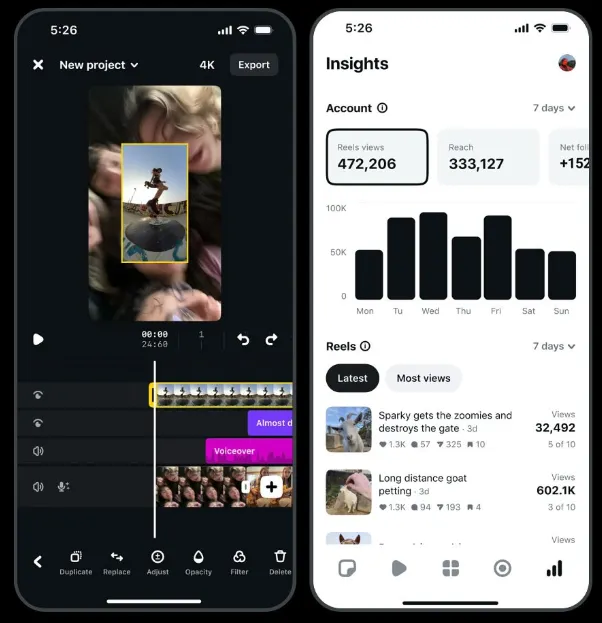
In addition to the cutting-edge teleprompter tool, Edits is also being enhanced with a new insights display. This feature allows creators to view their 10 most recent Reels uploads ranked by views, while Instagram has also introduced various overlay updates to improve the user experience.
However, the teleprompter remains the standout feature to note this week, highlighting Instagram’s commitment to empowering creators.
Instagram is actively rolling out updates for Edits, aiming to position it as the leading video editing application and surpass competitors like ByteDance’s CapCut as the go-to customization tool for creators.
So far, Edits has introduced a variety of new features, including:
- Expanded selection of fonts, filters, and voice effects
- Simplified editing for transitions
- Guides for safe zones and alignment
- Playback frame rate selection options
- Beat markers for aligning soundtracks
- Advanced options for cropping
- Enhanced sensitivity for tracking
- Editing features for volume levels
These additions complement the app’s initial feature set, which includes multi-channel editing, project management, custom video effects, extended video lengths, and much more.
Moreover, even more impressive features are on the horizon, such as AI-generated background editing, still image animation, and collaborative tools that will further enhance the creative process.
With such a wealth of features and enhancements, now is an excellent time to download the Edits app and explore the creative possibilities these new tools provide.
You can easily download Edits from both the App Store and Google Play Store.


 Clara Hastings
 Maya Kensington


