 Brandon Fletcher


Accidentally purchased a game? Don’t worry, you can still get a refund.
Did you purchase the wrong game or need a refund for an Xbox subscription? Follow these steps to reclaim your money.
Digital buyer’s remorse can hit unexpectedly. Perhaps the game looked far more appealing in the trailer, you selected the incorrect edition, or you recently discovered that subscription was silently renewing.
Fortunately, your Xbox purchase isn’t necessarily final. Microsoft allows refund requests for qualifying digital games, applications, add-ons, and other purchases. Xbox subscriptions, however, have a separate cancellation and refund process. Keep in mind that there are specific conditions, and simply purchasing something by accident does not guarantee a refund.
What Steps Should You Follow to Request an Xbox Game Refund?
Engadget
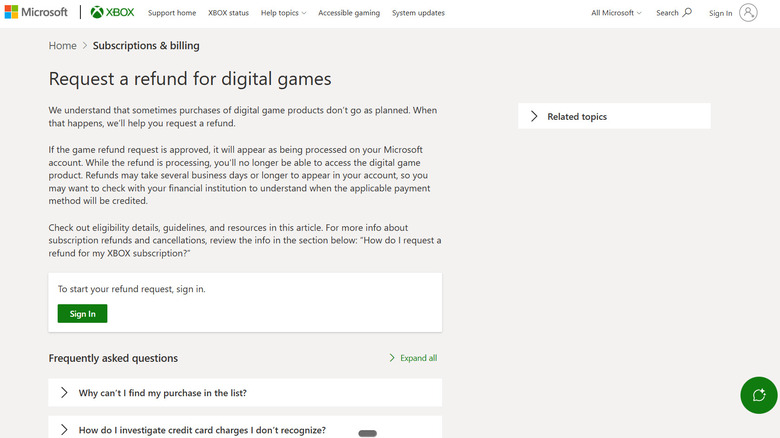
You won’t need to search your Xbox dashboard for a hidden refund option. All digital game refund requests are processed through Xbox Support online.
- Visit Xbox Support’s Request a refund for digital games page and log in to your account.
- Select the game or eligible purchase for which you want a refund.
- Click on Request a refund.
- Provide Microsoft with a reason for your request, then click Next.
- Ensure all details are accurate and click Submit.
If Xbox approves your refund request, you will also lose access to the digital game.
Which Xbox Purchases Qualify for Refunds?
This is where it becomes a bit more complicated.
According to Xbox, refunds for digital games are generally granted if the request is submitted within 14 days of purchase and the player hasn’t accrued a “significant amount” of playtime. Microsoft does not define what constitutes “significant,” so there is no exact hour count that guarantees your refund will be approved.
The 14-day guideline isn’t the absolute cutoff. Xbox allows refund requests to be submitted within 90 days of purchase, but Microsoft clarifies that not every request will be approved. They may impose limits based on the number, type, or total value of refunds granted to a single purchaser within a year.
This policy applies to digital game offers on the Microsoft Store, Xbox apps (excluding movie and TV apps), digital game bundles, permanent game content, and certain consumable items. Most in-game consumables and virtual currency are non-refundable once they have been purchased or used.
Pre-orders have a specific policy. Xbox states that you can cancel a digital game pre-order through your order history up to 10 days before the release date. Once the billing occurs, you may need to request a refund instead.
What is the Process for Getting a Refund on an Xbox Subscription?
Bangla press/Shutterstock
Microsoft has made the process a bit more complicated than necessary. Disabling recurring billing will stop the next charge, but your subscription will remain active until the current paid period expires. If your goal is simply to prevent future payments, you can cancel or downgrade your Xbox Game Pass subscription.
Requesting a refund for your most recent payment involves additional rules. Under Microsoft’s standard policy, a subscription may qualify for a refund within 30 days of the initial purchase or prior to the first recurring billing date, whichever comes first. The most recent recurring charge may also be eligible for a refund if you cancel within 30 days of that payment, although Microsoft limits this refund to once per account for each Xbox subscription product.
If you qualify for a refund, Microsoft will present the option to cancel immediately along with the refund. Keep in mind that prepaid codes are subject to the retailer’s return policy, and certain countries have additional prorated refund rights.
What is the Typical Timeframe for an Xbox Refund?
Xbox refunds do not happen instantly. Microsoft states that processing the request itself can take up to 72 hours. If your refund is approved, the funds are usually returned to the original payment method within an additional three to five business days. banks or payment providers may take longer to post the refund.
If Microsoft indicates that the refund has been issued but your balance remains unchanged, check with your bank rather than submitting another refund request. Microsoft advises customers to allow a few days for the payment provider to process the issued refund.
In the case of a denied request, Xbox allows you to appeal by responding to the email containing their decision. you cannot submit the same refund request again through the refund page.

 Daniel Mercer