David Bridges

Social media sites are so crowded that it can be difficult to stand out. Instagram alone has more than a billion monthly active users and 500 million daily active users. That makes it even more challenging to get noticed on the app. However, there are several ways you can cut through the noise.
Apart from posting interesting, high-quality content, you can focus on your bio to make it worthy of people’s attention. A quick way to achieve that is by uploading a good profile image. This article will show you how to upload a profile picture on Instagram—whether you’re a new user or it’s due for a change.
How to Change Your Instagram Profile Picture on Mobile
Whether you use Instagram on an iPhone or Android device, the steps you need to follow to change your profile picture are identical.
Here’s what you need to do on your phone:
- Open the Instagram app and tap on your Profile icon in the bottom-right corner of the screen.
- Now tap Edit profile at the top of the screen.
- Tap Change profile photo.
- At this point, you can either tap Take Photo to take a selfie or Choose from library. If you go with the latter, Instagram will take you to your phone’s library, where you’ll have to pick a suitable image. (More on choosing a profile picture for Instagram below.)
- Finally, tap Done in the top-right corner. Instagram will now start displaying your new picture.
That’s all it takes. This is one of the things new Instagram users should do first to complete their profiles. Having said that, you can also benefit from it if you’ve been on Instagram for a while, in case you need to switch things up. And if you want to try something different, you can opt to use an avatar as your Instagram profile picture instead of the age-old selfie.
A unique avatar is a sure way to make your Instagram profile stand out and instantly grab people’s attention, as most people use real photos of themselves as their profile pictures. After you’ve created an avatar, follow the steps above and tap Use avatar to set it as your profile photo.
How to Change Your Instagram Profile Picture on the Web
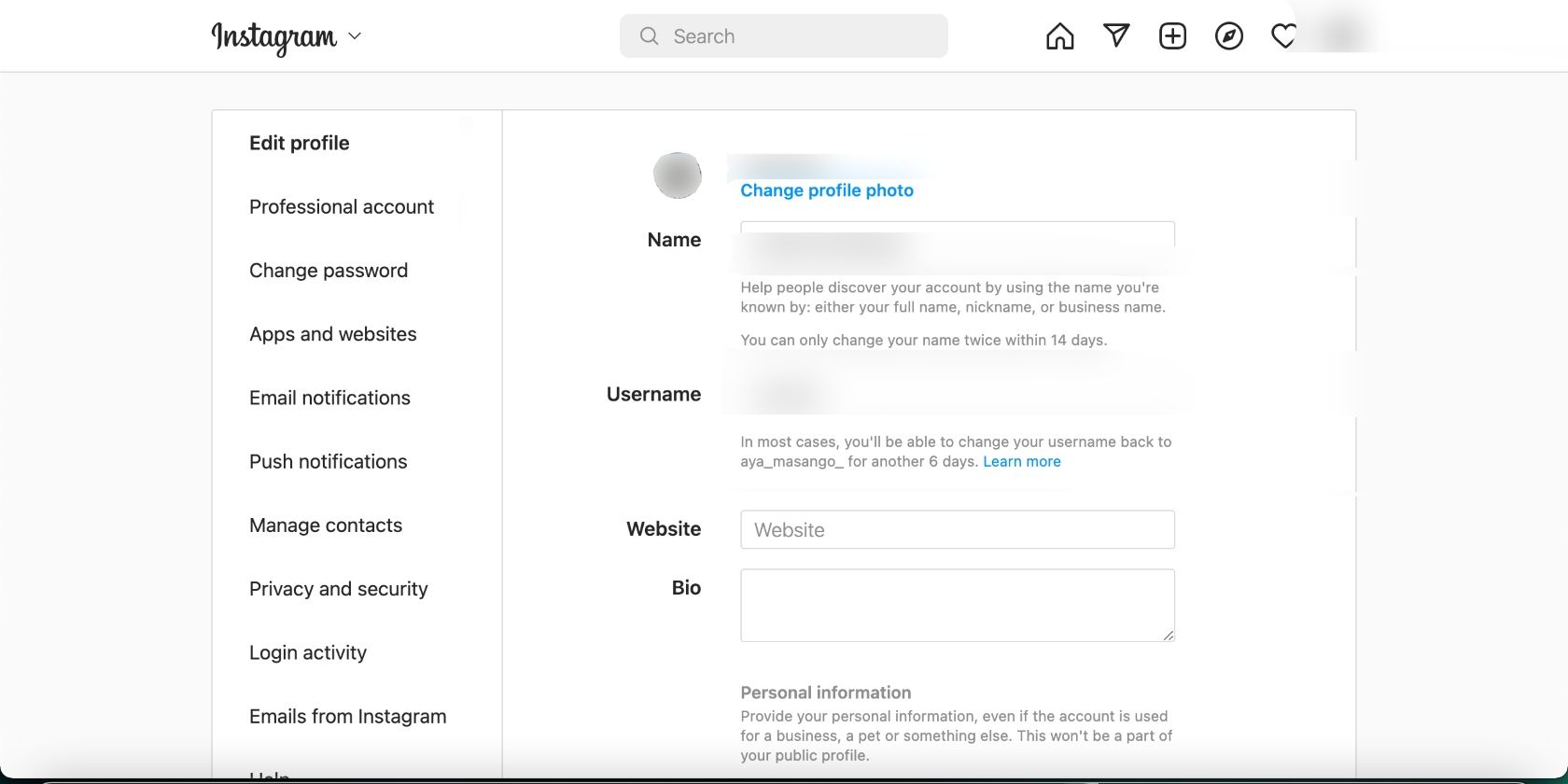
Changing your Instagram profile on the web is slightly different but just as easy. Here’s what to do:
- Log into your Instagram account in your browser.
- Click on your Profile picture in the top-right corner of the screen.
- Now click on Profile, followed by Edit profile.
- Click on Change profile photo at the top of the screen, followed by Upload Photo in the pop-up menu.
- This will bring up the file explorer on your computer. Use it to find the picture you like, and then click on Open in the bottom-right corner of the window.
You’re all set! Now, you know how to upload a profile picture to your Instagram account, no matter your device. Repeat this process whenever you want to change your profile picture on Instagram.
Tips for Choosing a Good Instagram Profile Picture

As we’ve mentioned before, your profile picture is one of the elements that can help your Instagram profile stand out—or any social media platform, for that matter. That’s why you should be intentional and smart about the picture you upload.
First and foremost, consider your niche. Unless it’s pets, nature, or something completely different, you should upload a picture of yourself. This also helps other Instagram users connect with you and know who’s behind the account they’re engaging with.
Because your Instagram profile appears as a small icon on your profile, it wouldn’t make sense to upload a full-body picture. You can reserve that for your Instagram grid. In fact, you can pin your three best photos to your Instagram profile.
Go for a clear photo of yourself from the neck up instead. Choose a photo where you’re smiling and appear warm and welcoming. Unless you use your Instagram profile for work or business purposes, try not to pick a photo where you look serious or unapproachable—leave that for your LinkedIn profile picture.

Finally, avoid uploading a profile picture that is heavily edited or has a filter on it unless it is consistent with the theme of your profile. For instance, if your profile has a black-and-white aesthetic, then it would make sense to upload a black-and-white profile picture. Otherwise, keep it bright and clear.
Stand Out With the Perfect Instagram Profile Picture
Every day, millions of profiles vie for people’s attention on Instagram. Your profile picture is often the first thing people notice while scrolling through their feed or when they land on your profile. You only have a few seconds to grab and keep their attention, so make them count with a clean, crisp profile picture.