 Mason Thompson

What creators need to know about Shorts thumbnails
- Custom thumbnails YouTube now lets all creators upload custom thumbnail images for Shorts.
- Editing options Creators can choose a thumbnail during upload or change it after publishing.
- Suggested frames Creators who do not upload an image can select a frame from the Short.
- Thumbnail ideas YouTube’s Ask Studio assistant can help creators brainstorm thumbnail concepts.
After initially telling creators that Shorts thumbnails were not particularly important for discovery, YouTube has reversed course and enabled custom thumbnail options for all creators. This update explains how creators can add or change a YouTube Shorts thumbnail.
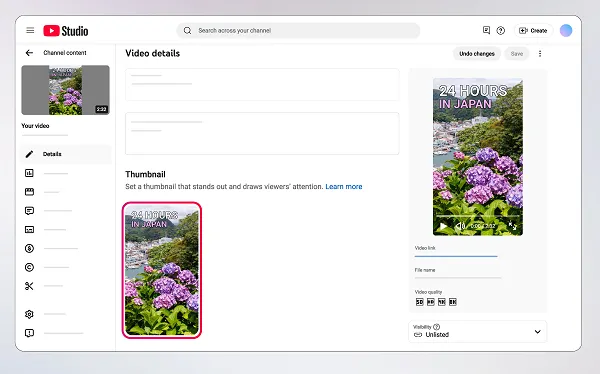
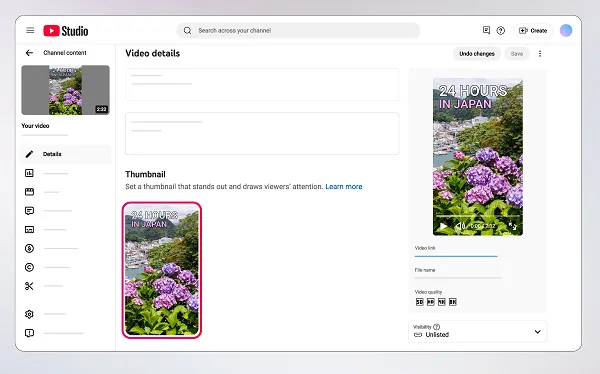
As shown in this example screen, posted by YouTube CEO Neal Mohan on X, creators can upload a custom thumbnail image through the Shorts flow in YouTube Studio.
YouTube’s head of editorial, Rene Ritchie, explained that creators using mobile or desktop can upload a thumbnail image during the upload stage. Creators can also change the video thumbnail after publishing.
Creators who do not want to upload a custom image can select a suggested frame from the Short to use as its thumbnail, Ritchie said.
Ritchie also said creators can use YouTube’s artificial intelligence-powered Ask Studio assistant to brainstorm thumbnail ideas.
Shorts thumbnail access was first made available to creators in the YouTube Partner Program in June, then gradually expanded over time.
Many creators had asked for Shorts thumbnails, although YouTube initially did not plan to add the feature.
In 2024, YouTube said Shorts thumbnails were less important than regular video thumbnails because most users find Shorts while scrolling through full-screen video displays, rather than tapping a smaller thumbnail to start a clip.
YouTube later added Shorts thumbnail customization, and this update completes the rollout of thumbnail creation options for all creators.
How can creators customize a YouTube Shorts thumbnail?
Creators can upload a custom image during the Shorts upload process or change the thumbnail after the Short is published. The feature also offers a suggested frame as an alternative to uploading an image.
YouTube Shorts creators can select a thumbnail during upload or update it after publication.
- Upload a custom image in the Shorts flow in YouTube Studio.
- Choose a suggested frame from the Short instead.
- Change the thumbnail after publishing.
The available choices cover both custom artwork and a frame taken from the video, so creators can choose the option that suits their Short.
Can YouTube help creators come up with thumbnail ideas?
Yes. Creators can use the Ask Studio assistant, YouTube’s artificial intelligence-powered assistant, to brainstorm ideas for a Shorts thumbnail.
Ask Studio can support thumbnail brainstorming, while creators choose and apply the final image or frame.
Why did YouTube change its approach to Shorts thumbnails?
YouTube said in 2024 that Shorts thumbnails mattered less than regular video thumbnails because viewers usually encounter Shorts while scrolling through full-screen videos. The platform later introduced thumbnail customization and expanded access to all creators.
YouTube initially viewed thumbnails as less central to Shorts discovery, then made customization available as creator access expanded.
The earlier explanation focused on how people watch Shorts: viewers commonly see clips in a full-screen feed instead of opening them from a smaller thumbnail. The eventual feature lets creators customize thumbnails despite that difference in viewing behavior.
Frequently asked questions about Shorts thumbnails
Can all creators customize Shorts thumbnails? YouTube has enabled Shorts thumbnail customization options for all creators.
Can creators change a Shorts thumbnail after publishing? Yes. Creators can change the thumbnail after the Short has been published.
Do creators have to upload a custom thumbnail image? No. Creators can select a suggested frame from the Short instead.
Can Ask Studio suggest thumbnail ideas? Yes. YouTube’s Ask Studio assistant can help creators brainstorm thumbnail ideas.

 Ivy Caldwell
 David Bridges