David Bridges

Instagram is a very popular social media platform where millions of people share photos, stories, videos, and more on a day-to-day basis. Like most social media platforms, Instagram allows users to have a username and a profile name. The username on Instagram has to be unique and it has certain restrictions like a max of 30 characters, must contain only letters, numbers, periods, and underscores, shouldn’t have spaces or other symbols, and more.
However, these rules are not applicable to the display name of your profile. The display names don’t have to be unique and Instagram allows you to have emojis, different fonts, styles, and more. In this guide, we will take a look at 100+ Instagram name styles that you can make use of so, your account stands out from the rest of the crowd. You can just copy and paste these on your profile.
Also Read: Instagram Username Change: How to Change Your Username on Instagram on App, Web
100+ Instagram Name Styles
- ✶⚛ 🎀 𝐼𝓇💍𝓃𝑀𝒶𝓃 🎀 ⚛✶
- 𝕀𝕣𝕠𝕟𝕄𝕒𝕟
- ℭ𝔞𝔭𝔱𝔞𝔦𝔫 𝔄𝔪𝔢𝔯𝔦𝔠𝔞
- ℂ𝕒𝕡𝕥𝕒𝕚𝕟 𝔸𝕞𝕖𝕣𝕚𝕔𝕒
- 👑💛 𝐓hØⓡ 👑💎
- Ⓣⓗⓞⓡ
- 【ɢᴛ】OFFICIAL
- ꧁🐼panda༒ᶠᶥʳᵉ꧂
- •Bad[×]Boy•
- 🌗Ma𝕣ve🅻
- ≪🆂🆄🆁🆅🅸🆅🅾🆁≫
- D̶̛̩̩̭̫̠͎͇̅̓͛̂̈́á̴͖͔̘̼̪̲͉͂̏r̷̛̞͉̩̺͕̯͓̫͋̿̈́͐̔̆̾͠͝ͅs̵͖͇͈̜̮͙̼͉̤̒̄͒͒̀̾͘̚ḩ̶̧͉̼͈̗̹͔̘̬̍͆̇̎̊ȃ̵̗̹̎̿́͆͆ņ̶͈̰̺͎͔̬͊
- 𝕯𝖆𝖗𝖘𝖍𝖆𝖓 ✝
- ᴎɒʜoЯ
- 🅂🅁🄸 ❅
- ❖™Gᴜᴄᴄɪ Gᴀɴɢ❖
- Ⳃᴳᵒᵈ〄᭄ᴙᴇⲧᴀᴇッ
- ꧁H҉A҉C҉K҉E҉R҉꧂
- 3 ι∂ισтs
- Dʌƴʌŋ
- Aɭoŋɘ ɭovɘʀ
- ᑎO ᑭᗩᑎGᗩ
- Đėvıł Ķıñg
- Kaɱiŋa
- CõCõ MÖõ
- cнaттer вoх
- Špicÿ Girł
- ŠîŁêñt Kïłlêr
- Ѕмдят Вөү
- ßãbÿ Ðøll
- Êvîl Âttïtùðe
- fαмσυѕ вяαи∂
- έķ νίĻĻάίή
- Ξυηκηοωηξ βογ
- Ρяɨɲȼ€$
- Hʌʀʌɱi Bʌcʜʌ
- Iŋŋocɘŋt Lʌɗĸɩ
- Lʌɗĸɩ Bɘʌʋtɩʆʋɭ
- Moŋ X’təɽ
- Mŗ Romantic
- Qʋɘɘŋ Oʆ ʜɘʌʀts
- Soʋɭ ʜʌcĸɘʀ
- sσul hαckєr
- Tërmïnätör
- wє αrє hulks
- ßaɗsʜàʜ
- ᗰᖇ ᗪEᐯIᒪ
- ᗷEᔕI ᗷOY
- ℓιғε αη∂ мυsιc
- Ǟʋɛռɢɛʀֆ
- ֆʊքɛʀ ʄǟʍ
- ░H░E░R░O░
- A̴k̴s̴h̴a̴y̴
- ▀▄▀▄▀▄🄸🄽🄳🄸🄰▀▄▀▄▀▄
- 𓂀 𝔾.𝕆.𝔸.𝕋 𓂀
- 𝒦𝒾𝓃𝑔 𝒦𝑜𝒽𝓁𝒾
- ★彡[ᴍꜱᴅ]彡★
- ✴✳ 🎀 𝒯𝑒𝒶𝓂 𝐼𝓃𝒹𝒾𝒶 🎀 ✳✴
- Ⓖⓐⓜⓘⓝⓖ Ⓖⓔⓔⓚ
- 〖ƝƁƘ〗
- Team ßEßÉS👑
- ✫︎𝐁𝐀𝐃 𝐃𝐄𝐕𝐈𝐋S✫︎
- TнєƝєχχтCℓαωs❥
- 𝕿ђeƑell𐍉wsђiƤ
- N҉o҉v҉a҉ ҉l҉e҉g҉e҉n҉d҉s҉
- ╰𝒩𝐸𝒲_𝒮𝒞𝐻𝒪𝒪𝐿╯
- MAFIA FAMILY亗
- ꧁☆☬League of Heroes☬☆꧂
- Ⓒⓛⓐⓝ™420™
- 🅃🄴🄰🄼 🅆🄸🄽🄽🄴🅁🅂
- 🍬👽 𝐌𝔸v乇𝓇丨Cᵏ𝕊 ♨♖
- 𝕽𝖊𝖈𝖞𝖈𝖑𝖊 𝕭𝖎𝖓
- คrēค 51
- §†råñgêr§
- (っ◔◡◔)っ ♥ 7 Rings ♥
- ≋M≋e≋n≋ ≋A≋t≋ ≋W≋o≋r≋k≋
- [̲̅4̲̅][̲̅2̲̅][̲̅0̲̅]
- мя ρєяfє¢т
- нεℓℓ вσү
- Bʀokəŋ’Aŋgəl
- Hærtlêss ßôý
- 尺のんム刀
- A̲b̲h̲i̲
- .•♫•♬• 卂𝔫d𝐫Ø𝕚Đ •♬•♫•.
- 🐒💎 ίØS ♚🐲
- P͓̽e͓̽a͓̽c͓̽e͓̽
- ☝💀 ģ𝔶𝓶 ŦⓡєⒶķ 🐨👽
- F͎i͎t͎n͎e͎s͎s͎
- T̴r̴a̴v̴e̴l̴l̴e̴r̴
- H͓̽e͓̽a͓̽l͓̽t͓̽h͓̽ ͓̽+͓̽ ͓̽W͓̽e͓̽a͓̽l͓̽t͓̽h͓̽
- ᗪIGITᗩᒪ ᑕᖇEᗩTOᖇ
- B҉l҉o҉g҉g҉e҉r҉
- ☜♤ ᗯO𝓇D丂мⒾтh ✎
- B̾a̾n̾k̾e̾r̾
- 🍔👍 𝔣ᗝⓞⓓι𝑒 🍓 🍒
- Ćhlê†ê
- §wïmmêr
- 𝕷𝖔𝖓𝖊𝖑𝖞 𝖂𝖔𝖑𝖋
- ɭ๏г๔ ๏Ŧ Շђє гเภﻮร
- ค¢ti໐ຖ ¢ค๓ērค liງhtŞ
- 𝒮𝒶𝓌𝑔𝓎𝒷𝑜𝓎
- ᵢₙₛₚᵢᵣₑ Yₒᵤ ୬
- Nιɳʝαʂƚιƈ Nιɳʝα ⌜
- Ꭰąվ ටաӀ 𓐍
- 【attitudeboy ཻུ۪۪⸙͎】
- 🍩 ⋆ 🍑 🎀 𝒯𝑒𝒸𝒽𝓃𝒾𝓈𝒽𝒾𝑒𝓃 🎀 🍑 ⋆ 🍩
- ]|I{•——» 𝓅𝕣όfєsS𝔢Ⓡ_χ «——•}I|[
- gᗴ€𝐤ˢᵗ𝔸𝐑
- pⓄσℓ𝐝𝓤𝓭Ẹ
- Bₐd cₐₚₜₐᵢₙ <3
Also Read: Instagram: How to Create a Second Instagram Account and Switch Between Multiple Accounts
How to Change Name On Instagram Android
- Open the Instagram app on your Android device
- Tap on your profile photo on the bottom right
- Select the “Edit profile” option, which is present below your profile picture
- In the Edit profile screen, tap on the name option
- Remove the existing name and type or copy-paste from the above list
- Tap on the blue check mark again on the top right in the Edit profile screen
- Your Instagram name will be updated
How to Change Name on Instagram iPhone
- Open the Instagram App on your iPhone
- Tap on your profile photo on the bottom right
- Select the “Edit profile” option, which is present below your profile picture
- In the Edit profile screen, tap on the name option
- Remove the existing name and type or copy-paste from the above list
- Tap on the blue check mark again on the top right in the Edit profile screen
- Your Instagram name will be updated
Also Read: Instagram Captions: 100+ Best, Cool & Unique Captions For Your Instagram Post
How to Change Name on Instagram Desktop
- Visit Instagram.com on your desktop browser (make sure you have logged in)
- Click on your profile picture on the right
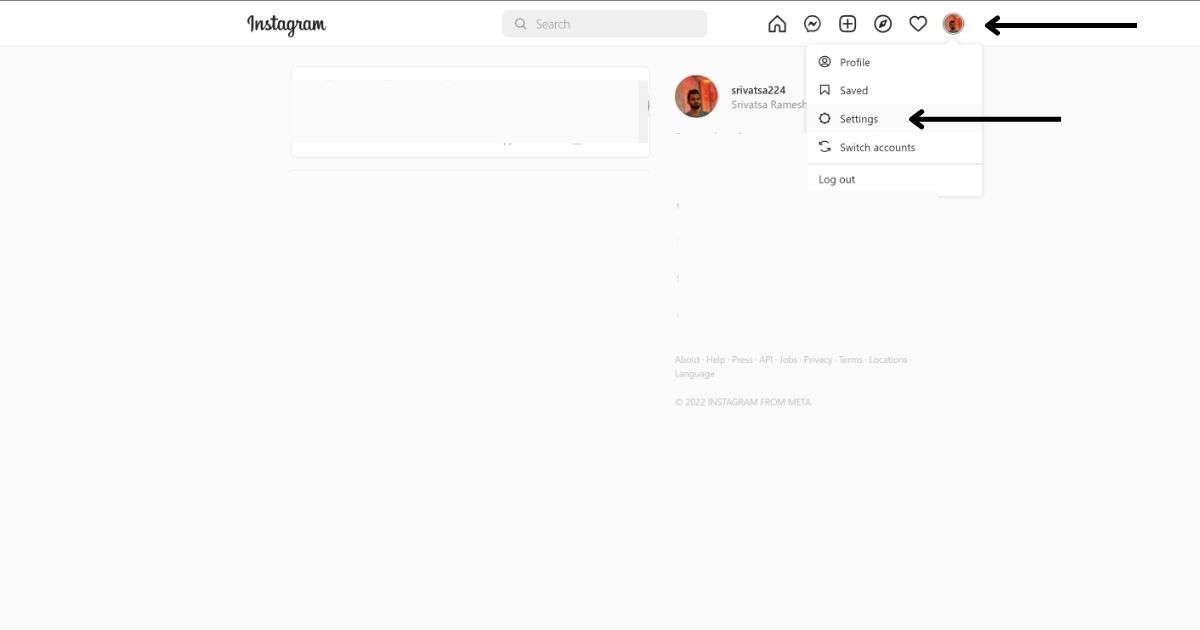
- Select the “Settings” option
- Make sure you have selected the “Edit Profile” option on the left navigation bar
- Remove the existing name from the name field
- Enter the new user name you’d like to use or copy-paste from the above list
- Scroll down and click on “Submit”
- Once you have clicked on Submit, your new name will be saved
Thanks for reading till the end of this article. For more such informative and exclusive tech content, like our Facebook page



 Maya Kensington
 Ivy Caldwell