 David Bridges

What the Instagram iPhone Duo update changes
Instagram for iPhone Duo adapts the app to the device’s expanded display, giving users a way to view more content and controls on screen. This article explains how the layout changes across the feed, Reels, Stories, messages and notifications.
Instagram’s iPhone Duo app uses the larger display to show more content at once.
- Feed layout: The Instagram feed uses a wider presentation on the open device.
- Reels view: Reels and their comments appear side by side while the video keeps playing.
- Folded display: Stories and Reels retain their familiar vertical format when the phone is folded.
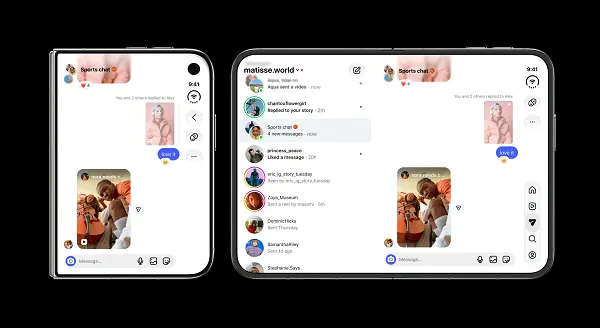
- Inbox layout: Messages and notifications use two columns for the inbox and highlighted conversations.
The main change is a more spacious Instagram interface on the unfolded iPhone Duo; when folded, Stories and Reels keep a vertical presentation.
How does Instagram’s iPhone Duo layout change the feed and Reels?
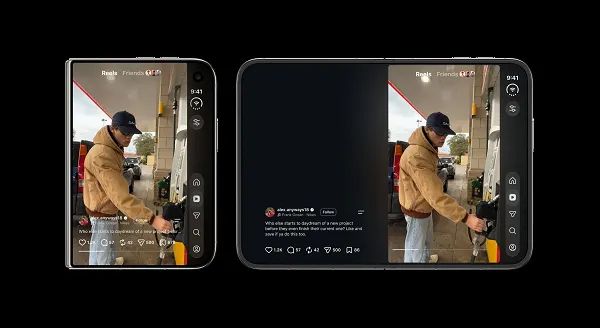
On the open iPhone Duo, the Instagram feed appears in a wider format, while Reels place comments beside the video. The side-by-side layout lets viewers follow comments without reducing the Reel’s size.
Instagram’s iPhone Duo layout shows Reels and comments together on the expanded display.
Instagram has launched a dedicated iPhone Duo version of its app that uses the device’s expanded display capacity to enable more on-screen functions.
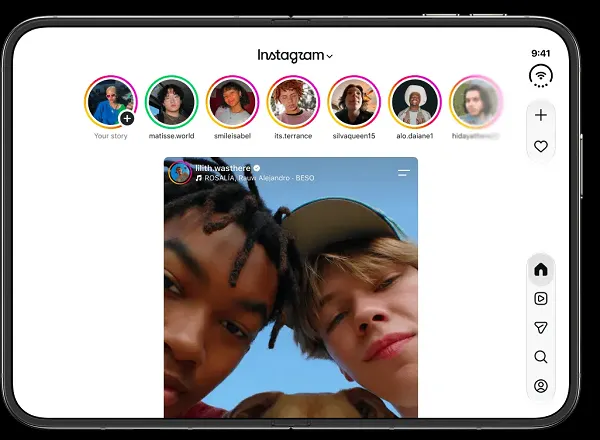
As shown in this example image, the main Instagram feed opens in a wider presentation format, with more room on the screen.
For Reels, the iPhone Duo version of Instagram displays posts and comments side by side, making it easier to view both elements.
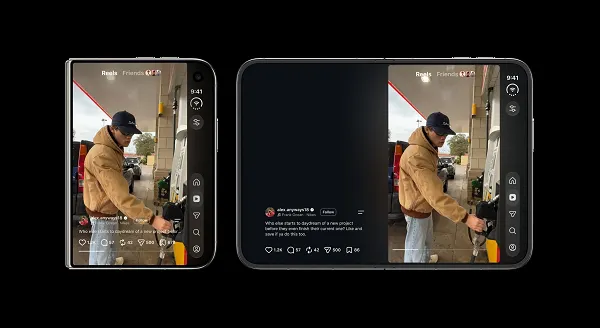
As explained by Instagram: “When your phone is open, you can read comments beside a full-size Reel. The video keeps playing while you read along, so you can follow the conversation without shrinking what you’re watching.”
Instagram’s control buttons have moved to the sidebar, leaving more screen space for photos and videos.
“When your phone is folded, Instagram Stories and Reels keep their familiar vertical format,” Instagram said.
How are Instagram messages and notifications arranged?
On the expanded iPhone Duo display, Instagram messages and notifications use two columns. The inbox appears on one side and highlighted exchanges on the other.
Instagram’s two-column layout separates the inbox from highlighted conversations.
Messages and notifications open in a two-column layout, with the inbox on one side and highlighted exchanges on the other.
What does the iPhone Duo format mean for Instagram users and creators?
The wider Instagram interface can show content and related comments together, which may make it easier to follow conversations while viewing posts. The layout is limited to iPhone Duo users, so it does not apply to every Instagram audience.
The iPhone Duo display format changes how Instagram content and comments appear, but its availability is limited to Duo users.
The custom Instagram presentation format could create new opportunities for engagement and interaction by making it easier for users to view content and related comments on one screen.
The display format could also affect content considerations for creators, although it is restricted to iPhone Duo users, which limits its audience.
This is a new view for Instagram that aligns with Apple’s latest display approach.
Instagram also launched a Duo version of its Edits app last week.
What should users know about Instagram on iPhone Duo?
Instagram on iPhone Duo presents the feed, Reels, messages and notifications in layouts designed for the expanded display. The folded phone retains the vertical format for Stories and Reels.
The Instagram Duo experience varies with the phone’s open or folded position.
Does Instagram show Reels comments beside the video on iPhone Duo?
Yes. On the open phone, Instagram Reels can appear alongside comments, while the video continues playing.
What happens to Instagram Stories when iPhone Duo is folded?
Instagram Stories keep their familiar vertical format when the phone is folded.
How are Instagram messages displayed on iPhone Duo?
Instagram messages and notifications open in two columns, with the inbox on one side and highlighted exchanges on the other.



 Sophie Langley