David Bridges

Did you know that you can enhance your Meta account by adding multiple unique versions of your avatar? This feature allows for greater personalization and expression in your online presence.
Indeed, while the reasons for wanting several avatar characters may vary, whether you’re looking to change your appearance or adapt your representation for different platforms, this feature gives you the flexibility to do so. Enjoy experimenting with different looks and styles that resonate with various aspects of your personality.
As illustrated in these example screens (please note that I’ve never created an avatar myself, so I am unsure about the specifics of these variants), if you wish to generate an alternate avatar character for your Meta profile, which will subsequently appear in avatar options across all of your linked accounts such as Facebook, Messenger, and Instagram, you can easily do this by navigating to your Settings and selecting the “Avatar” option.
This action will direct you to the Meta Avatar editor. From there, you can access the three dots menu and choose “Switch Avatar” from the dropdown list. This allows you to either select an existing avatar or create a brand-new one using the comprehensive avatar creation tools provided by Meta.
This could be an exciting opportunity to explore different representations of yourself, utilizing Meta’s continually evolving avatar generation tools to create fun and unique variations that reflect your style and personality.
Meta is consistently enhancing its avatar creation process with the aim of integrating these characters into its augmented reality (AR) and virtual reality (VR) experiences. The company’s vision for the metaverse includes the use of digital representations to navigate and interact within its expansive digital environments. As such, Meta is continually refining and improving its avatar tools, providing users with more opportunities to personalize their digital likeness.
In fact, just last week, Meta introduced new body types, along with fresh avatar poses and emotes.
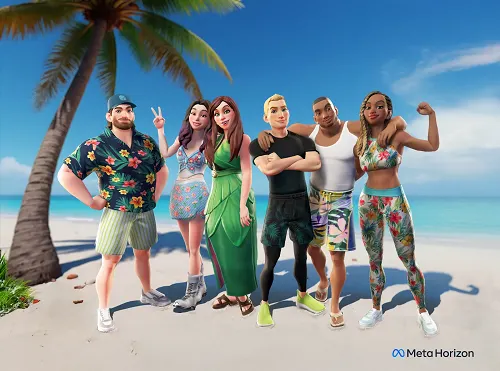
Additionally, the avatar editor has been updated in the Horizon mobile app, which allows users to refresh their character’s style through interactive conversational AI prompts, enhancing the customization experience.
Meta Horizon Creator Partners can now also upload custom textures or leverage generative AI retexturing tools to craft bespoke avatar clothing within the Horizon Creator Portal. Furthermore, new parametric face controls have been introduced for even greater customization.
When you add hairstyles, facial hair options, makeup, face paint, freckles, beauty marks, bindis, and more, you open up billions of combinations and possibilities to create the perfect avatar that reflects your individuality.
While it is uncertain if these features have gained widespread popularity yet, there is definitely an increase in users incorporating their Meta avatars across various platforms, particularly in custom stickers and posts on Facebook.
Now, with the ability to experiment with multiple avatars concurrently, you can explore new options and styles, helping you to discover which avatar best aligns with your desired online presence.

 Troy Sanders
 Tessa Everly