Ethan Carter

Explore the advantages of a wired connection and learn how to set it up effectively.
When considering how to utilize a smartphone as a mobile hotspot, many people instinctively think of wireless options. USB tethering provides an effective method to share your phone’s cellular data connection with a computer using a physical cable. This method has specific advantages, and below, we will explain how it operates, its benefits, and provide a step-by-step guide for setup.
What Are the Benefits of USB Tethering?
While many users prefer wireless hotspots for their convenience in connecting laptops to the internet away from home, USB tethering offers unique advantages. A wired connection generally provides greater stability, especially in crowded environments like airports or convention centers. USB tethering minimizes the risk of broadcasting a public network, enhancing your security. Another benefit is that while tethered, your phone may also charge, providing dual functionality.
Step-by-Step Guide to Setting Up USB Tethering
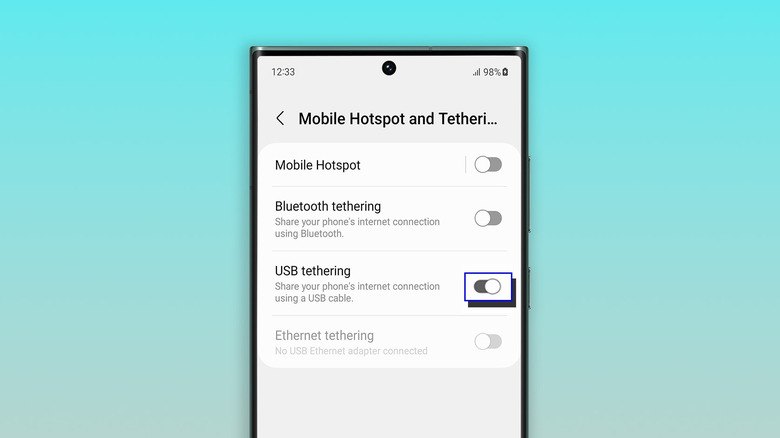
Screenshot by Will Shanklin (Samsung)
Before we begin, it’s essential to understand a crucial limitation: Android devices cannot tether via USB to a Mac. You can still create a Wi-Fi hotspot as an alternative. USB tethering is compatible with other configurations, such as Android to Windows and iPhone to either Mac or Windows systems.
If you are connecting an iPhone to a Windows PC, it’s necessary to install the Apple Devices app or iTunes for Windows from the Microsoft Store.
- Use a USB cable to connect your Android smartphone to a Windows PC.
- On your phone, go to Settings > Network & internet > Hotspot & tethering. (On some devices, this may be found under Settings > Connections > Hotspot & tethering.) Alternatively, swipe down to access Quick Settings, then press and hold the Hotspot icon to access the tethering menu directly.
- Enable USB tethering. If the option appears grayed out, ensure that you are using a data-capable USB cable, not a charge-only cable.
For iPhone Users:
- Connect your iPhone to a computer via a USB cable.
- You might encounter authentication prompts. If your iPhone requests you to trust the computer, select Trust and enter your passcode. If you are connecting to a Mac and see a prompt saying “Allow accessory to connect,” click Allow.
- On your iPhone, navigate to Settings > Personal Hotspot. (If you haven’t used a hotspot previously, you may need to start under Settings > Cellular > Set up Personal Hotspot.)
- Activate Allow Others to Join.
Important Considerations for USB Tethering
USB tethering is typically best suited for connecting a single device, rather than serving as a full hotspot replacement. For instance, if you need to connect both a laptop and a tablet simultaneously, using a Wi-Fi hotspot would be more effective.
Be aware that laptops may consume significant amounts of data due to background activities like updates and cloud synchronization. Your mobile carrier might impose restrictions on hotspot usage, charge additional fees, or count tethering against a separate data cap. It’s wise to review your data plan before proceeding with USB or Wi-Fi tethering.
Lastly, while a wired connection usually offers more stability than a wireless option, it still depends on your phone’s cellular signal. If your service is inconsistent, you will experience an unreliable internet connection regardless of how you connect.


 Daniel Mercer