Roll Back to Google Assistant on Your Android Phone Easily

Spread the love


Revisit a More User-Friendly Experience.

If Gemini is causing frustration, you’re not alone. Many users express their dissatisfaction with this AI assistant, particularly those who rely on their Android devices for managing smart home technology. Even if you don’t use your phone for smart home control, you might still find Gemini lacking. Slow response times, misunderstanding commands, and providing inaccurate information like weather updates or local business details can all contribute to a poor experience. Repeated errors, such as “Something went wrong, please try again,” can be incredibly frustrating.

Fortunately, you don’t have to stick with Gemini. Below, we outline straightforward steps to help you switch back to Google Assistant on your Android device. If you’re also looking to reduce Gemini’s presence in other Google applications like Gmail or Chrome, our previously published guides will assist you with that as well.

What Steps Should You Follow to Revert to Google Assistant?

Follow these steps on any standard Android smartphone to make the transition.

  1. Access the Settings menu.
  2. Select the Apps section.
  3. Locate the Assistant option.
  4. Scroll down to the “Digital assistants from Google” area.
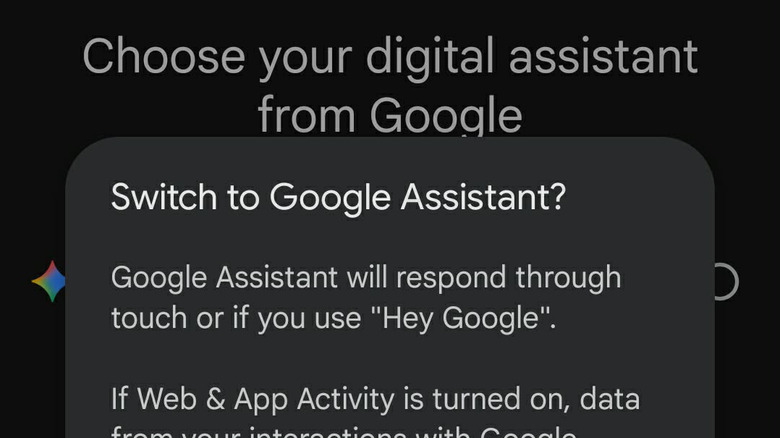
  5. On this screen, select Google Assistant instead of Gemini.
  6. Confirm your choice, and you’re all set.
See also  Get 3 Months of Disney+ for $2 Each And Attempt to Binge Every Disney Movie and Show Before You Cancel

For devices with custom Android skins, like Samsung (One UI), Xiaomi (HyperOS), or Oppo (ColorOS), the options may vary. In such cases, try these alternative steps:

  1. Launch the Google app on your device.
  2. Tap on your Google profile icon located at the top right corner.
  3. Select the Settings option.
  4. Choose Google Assistant from the menu.
  5. Scroll down to find the “Digital assistants from Google” section and select it.
  6. From here, you can choose between Gemini and Google Assistant.

If you want to minimize Gemini’s presence across various applications, our additional guides can help. I previously mentioned instructions for removing Gemini from Google apps, ensuring it doesn’t interrupt your work in Sheets or Docs. Keep in mind that removing Gemini might disable some features in your Workspace applications. If you’re looking to reduce Gemini-related results in your web searches, follow our instructions on disabling Google’s AI Overviews.

best barefoot shoes

Visit this link for the original content. The images used in this article are sourced from there and are utilized solely for informational purposes with appropriate credit to the original authors.

  • Ethan Carter

    Ethan Carter is a prolific author and technology enthusiast, known for his insightful writings on the evolving landscape of digital innovation at Social Schmuck. With a keen eye for emerging trends and a passion for bridging the gap between complex technology concepts and everyday applications, Ethan captivates his readers with engaging narratives and thought-provoking analyses. His work not only informs but also inspires others to navigate the rapidly changing tech world with confidence and curiosity.

    Related Posts

    Money Robot Submitter Review 2026: Is This Backlink Automation Tool Worth It?

    Spread the love

    Spread the love Share It: ChatGPT Perplexity WhatsApp LinkedIn X Grok Google AI Money Robot Submitter Review 2026 Money Robot Submitter Review: Powerful Backlink Automation — But Is It Worth…

    Read more

    AI Copycats Prompt Game Developers to Cancel Public Demo

    Spread the love

    Spread the love Share It: ChatGPT Perplexity WhatsApp LinkedIn X Grok Google AI The video game industry is currently experiencing significant tension due to the rise of AI tools. This…

    Read more

    Leave a Reply

    Your email address will not be published. Required fields are marked *

    You Missed

    Money Robot Submitter Review 2026: Is This Backlink Automation Tool Worth It?

    Money Robot Submitter Review 2026: Is This Backlink Automation Tool Worth It?

    Musk’s Idea Slowed Starshield Development, Reports Say

    Musk’s Idea Slowed Starshield Development, Reports Say

    Puerto Rico Home Bought by Tyler Perry for $30 Million

    Puerto Rico Home Bought by Tyler Perry for  Million

    AI Copycats Prompt Game Developers to Cancel Public Demo

    AI Copycats Prompt Game Developers to Cancel Public Demo

    Political Power Play: Zuckerberg’s $65M Move Shifts Focus

    Musk’s Idea Slowed Starshield Development, Reports Say

    Yung Miami Discusses City Girls Reunion and JT Relationship

    Yung Miami Discusses City Girls Reunion and JT Relationship

    Ethernet and Wi-Fi: Do You Need Both for Your Home?

    Ethernet and Wi-Fi: Do You Need Both for Your Home?

    Make Money on Twitter and VK: A Family Guide from UCO

    Musk’s Idea Slowed Starshield Development, Reports Say

    Original Uncut Maasranga TV Viral Video on Instagram

    Musk’s Idea Slowed Starshield Development, Reports Say

    Witney Carson Celebrates 33rd Birthday with Hot Shots!

    Witney Carson Celebrates 33rd Birthday with Hot Shots!