

 David Bridges

Discover TikTok’s Newly Enhanced Desktop Application for an Optimized User Experience
The latest update from TikTok features a redesigned desktop application that closely mimics the engaging in-app experience users love. The new layout is modular, effectively adapting the vibrant full-screen mobile interface to fit perfectly within the dimensions of your PC display. This change aims to enhance user interaction and provide a seamless transition between devices for TikTok enthusiasts.
TikTok has strategically repositioned the navigation bar to utilize the larger screen space effectively, making it easier to navigate through content. This redesign not only improves accessibility but also minimizes distractions during video playback, allowing users to immerse themselves in their favorite clips without interruptions. This thoughtful adjustment is crucial for enhancing the overall viewing experience on desktop devices.
The revamped desktop experience now features an updated “For You” feed and a newly introduced Explore tab, both tailored for web viewing. These enhancements ensure that users can discover trending content effortlessly and enjoy personalized recommendations in a format that aligns with the desktop browsing experience. TikTok’s commitment to improving user engagement is evident in these updates, encouraging users to explore more of what the platform has to offer.
Moreover, TikTok has improved its live-stream presentation capabilities, offering a more responsive display that can adapt to various formats. This means creators can deliver their content in a way that best suits their style, enhancing the viewing experience for audiences. The flexibility in presentation options reflects TikTok’s dedication to catering to diverse creator needs and viewer preferences.
According to TikTok’s official statement:
“Go LIVE in portrait or landscape mode, delivering a full-screen horizontal view for desktop users, while mobile users can simply rotate their devices to enjoy an equally dynamic viewing experience.”
This upgraded live-stream display is particularly advantageous for gaming streamers, as it allows for a more immersive experience that can engage a broader audience. The ability to adapt to different viewing formats is a game changer for content creators looking to maximize their reach and impact on the platform.
Additionally, TikTok has introduced a new floating player option for users on Google Chrome, which keeps the TikTok player visible above other windows. This feature enables users to multitask effectively without missing out on their favorite content. Alongside this, the new “Collections” feature allows users to organize their favorite clips more efficiently, making content management a breeze.
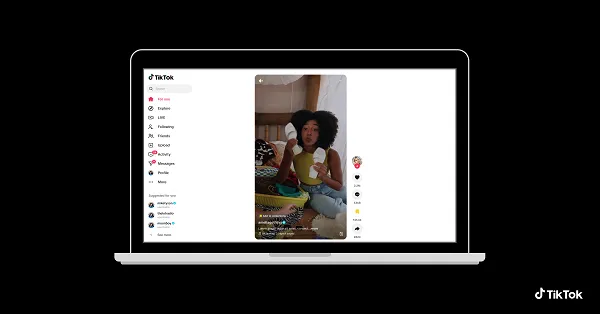
While the changes may not seem monumental at first glance, they are designed to enhance user engagement and interaction with TikTok in a way that aligns closely with the mobile experience. The updated format acts like an emulator, framing the screen in a mobile-like layout that seeks to recreate the immersive in-app experience for desktop users instead of merely supplementing it.
Most TikTok users will still primarily access the app on mobile devices; however, these enhancements could significantly benefit those who prefer engaging with TikTok on a desktop. This update aims to provide a more cohesive and enjoyable experience, allowing users to connect with the platform as its creators intended.


 Troy Sanders
 Mason Thompson


