Personalized ‘Year in Review’ Summaries from LinkedIn

Spread the love

Highlights

  • Overview: LinkedIn’s “Year in Review” provides a personalized snapshot of your engagement over the past year.
  • Access: You can find your summary by searching for “LinkedIn Year in Review” in the app.
  • Engagement Metrics: The summary includes connection stats, post activity, and peak usage times.
  • Insights: It offers insights on your key connections and a character summary based on your activity.
This audio is auto-generated. Please let us know if you have feedback.

Have you checked out your “Year in Review” on LinkedIn yet?

Currently being rolled out to all users, LinkedIn’s Year in Review provides an overview of your activity in the app throughout the year, giving you a fun breakdown of how active you were in building your LinkedIn presence.

You can access your own LinkedIn year in review by searching for “LinkedIn Year in Review” in the app, or tapping on the notification in-stream.

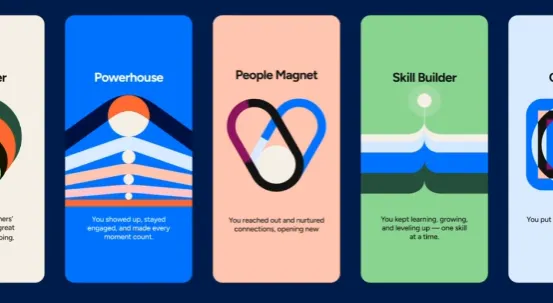
LinkedIn’s Year in Review gives you a personalized overview of your activity in the app throughout the year, including how many connections you’ve made and followers you’ve gained, where those connections work (and how many have changed jobs), how many posts and comments you made, certifications and skills added, when you joined the platform, and more.

It also gives you a summary overview of what time of day you’re most active in the app.

LinkedIn Year in Review

LinkedIn’s Year in Review also shows you who you engaged with most, so you know who your key connection is, while your summary may also include a reminder of who your first connection was when you created your LinkedIn profile.

See also  Freakier Friday Critic Faces Jamie Lee Curtis's Backlash on Social Media

Which may be helpful, maybe not, while LinkedIn has also added a character summary, which aims to encapsulate who you are, based on your LinkedIn activity.

LinkedIn Year in Review

The activation is a fun summary of your LinkedIn engagement, which could serve as a reminder to step up your game next year, or a reinforcement of your on-platform efforts.

It’s a good-looking, engaging summary, though it probably doesn’t add much in terms of contextual insight, but it does give you a handy overview of your LinkedIn use.

I mean, what would really be helpful is a count of how many times each specific profile visitor returned to your profile throughout the year, or any additional notes on who’s creeping on your page. That might be more revealing, while LinkedIn could also give you info on which LinkedIn Learning courses are popular among those in your industry.

Maybe that would add something more practical here, but it’s a fun activation either way.

LinkedIn’s Year in Review summaries are available in English, Spanish and Portuguese.

Here you can find the original content; the photos and images used in our article also come from this source. We are not their authors; they have been used solely for informational purposes with proper attribution to their original source.

  • David Bridges

    David Bridges

    David Bridges is a media culture writer and social trends observer with over 15 years of experience in analyzing the intersection of entertainment, digital behavior, and public perception. With a background in communication and cultural studies, David blends critical insight with a light, relatable tone that connects with readers interested in celebrities, online narratives, and the ever-evolving world of social media. When he's not tracking internet drama or decoding pop culture signals, David enjoys people-watching in cafés, writing short satire, and pretending to ignore trending hashtags.

    Related Posts

    Gen Z Cinema: Exploring Identity and Anxiety in Social Media

    Spread the love

    Spread the love Share It: ChatGPT Perplexity WhatsApp LinkedIn X Grok Google AI Exploring the Connection Between Social Media, Anxiety, and Identity in Gen Z Cinema  Yahoo Click here to access…

    Read more

    Speed Keyboard Escape Script: Auto Farm & Walk Features

    Spread the love

    Spread the love Share It: ChatGPT Perplexity WhatsApp LinkedIn X Grok Google AI +1 Speed Keyboard Escape offers an engaging simulation where players navigate a delightful, candy-themed parkour course. With…

    Read more

    Leave a Reply

    Your email address will not be published. Required fields are marked *

    You Missed

    Money Robot Submitter Review 2026: Is This Backlink Automation Tool Worth It?

    Money Robot Submitter Review 2026: Is This Backlink Automation Tool Worth It?

    Resonant’s Perspective: New York Mirrors the Backrooms

    Resonant’s Perspective: New York Mirrors the Backrooms

    Ted Lasso Actor’s Death: What Happened?

    Ted Lasso Actor’s Death: What Happened?

    Gen Z Cinema: Exploring Identity and Anxiety in Social Media

    Gen Z Cinema: Exploring Identity and Anxiety in Social Media

    Bitcoin Price Reaches Lowest Point Since Pre-Trump Election

    Bitcoin Price Reaches Lowest Point Since Pre-Trump Election

    Speed Keyboard Escape Script: Auto Farm & Walk Features

    Speed Keyboard Escape Script: Auto Farm & Walk Features

    Karrahbooo Sets the Record Straight on Lil Yachty Relationship

    Karrahbooo Sets the Record Straight on Lil Yachty Relationship

    SpaceX Announces Pricing for Historic I.P.O.

    SpaceX Announces Pricing for Historic I.P.O.

    Moon phase today: How the Moon will appear on June 6, 2026

    Moon phase today: How the Moon will appear on June 6, 2026

    After the Wedding: Exploring Life in Hollywood

    After the Wedding: Exploring Life in Hollywood