 Daniel Mercer


Prevent Instagram from using your off-app activity to target ads effectively.
Instagram can create an eerily accurate ad experience. For instance, if you browse a product on an external site, you might see an ad for that same product in your Instagram feed shortly after. Meta asserts that it does not utilize your phone’s microphone to listen to your conversations for this purpose. Instead, information might be shared by retailers, apps, or other businesses based on your interactions with them.
Unfortunately, there isn’t a single setting to entirely halt Instagram from collecting or utilizing your data. Meta continues to gather insights from your searches, likes, follows, posts, and clicks within the app. It also collects device and network details, location signals, data from businesses, and information shared across linked accounts. Meta AI leverages activity from both Facebook and Instagram to customize its recommendations. To effectively limit Instagram’s tracking, you should adjust the settings for each data source individually.
Disable Personalization from External Businesses
Novak Bozovic for Engadget
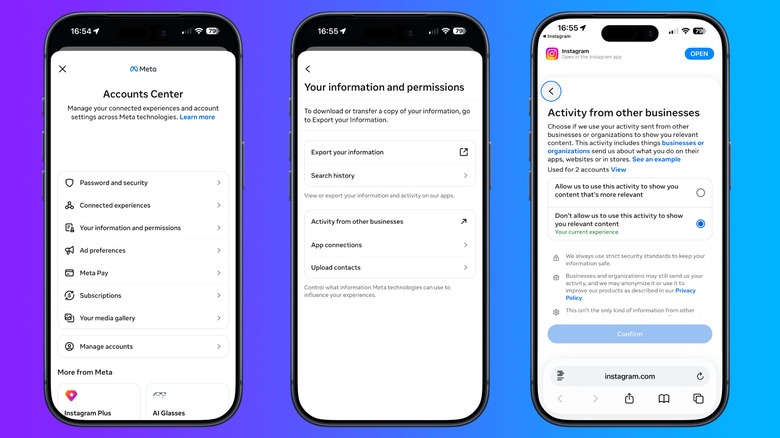
In July 2026, Meta introduced a broader control called Activity from other businesses. This feature replaces the previous Your activity off Meta technologies and enhances an earlier ad setting known as Activity information from ad partners. This control allows you to determine whether businesses can use the data they send to personalize ads, content in your Feed, and AI responses.
To modify this setting, launch Instagram, navigate to your profile, tap on the three-line menu, and select Accounts Center. Locate Activity from other businesses. Since Meta is rolling out this feature by country, some users may still see Ad preferences > Ad settings > Activity information from ad partners. Choose the option that prevents Meta from utilizing this activity for ad personalization.
Disabling this setting does not stop businesses from sending data or prevent Meta from tracking your activity within Instagram. Advertisements can still be influenced by the accounts you follow, the posts or Reels you interact with, your searches, ad clicks, profile details, or customer lists provided by advertisers. This setting ensures that your off-platform activity does not influence your ad experience, but it does not eliminate all forms of ad personalization.
In the European Region, the Accounts Center offers options for personalized or less-personalized ads under Ad preferences > Ad settings > Ad experience. The less-personalized option uses fewer signals, but Meta will still consider factors like age, location, device information, ad interactions, and content visible during your current session.
Control Instagram’s Access to Your Device and Accounts
Novak Bozovic for Engadget
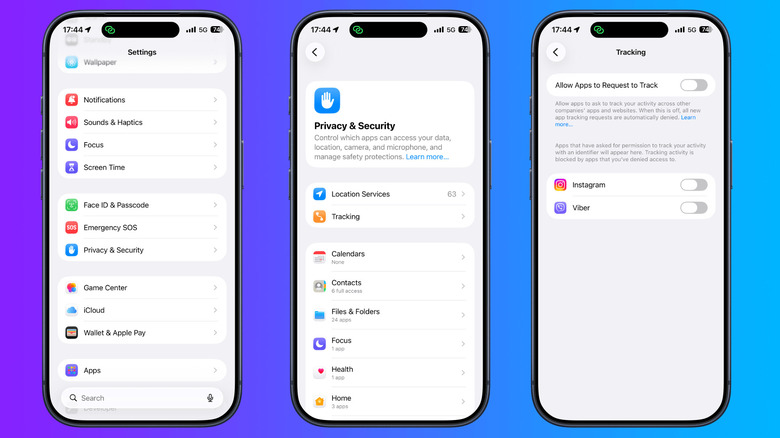
On an iPhone, navigate to Settings > Privacy & Security > Tracking and disable Instagram’s permissions. Apple’s Ask App Not to Track feature blocks tracking across other companies’ apps and websites for advertising or sharing information with data brokers. This does not prevent Instagram from tracking your activities within its own app.
For Android users, go to Settings > Apps > Instagram > Permissions. Assess access to location, contacts, photos, videos, camera, and microphone, denying permissions that are unnecessary. Disabling location services removes one source of data, but Meta may still estimate your location using your IP address, network information, device signals, and account activity.
Be sure to check contact syncing separately. Navigate to Accounts Center > Your information and permissions > Upload contacts, select the Instagram account, and turn off Connect contacts on all devices. This action halts future syncing but does not eliminate contacts already uploaded. To remove those, use Manage contacts in Accounts Center on Instagram.com. Meta indicates that deletion can take up to 90 days.
Meta also utilizes information from accounts linked within the same Accounts Center to tailor ads and suggest accounts to follow. If you remove an account under Accounts Center > Accounts, it will be deleted from that Accounts Center, but shared logins and other connected features may be disabled. This action does not delete the account or its existing information.
Minimize Data Collection from AI Conversations
Novak Bozovic for Engadget
On December 16, 2025, Meta began using interactions with its AI features as signals for content and ad personalization in most regions. For example, discussing hiking could lead to recommendations for hiking-related posts or products later. Meta has not provided a dedicated setting that allows users to engage with Meta AI while excluding those conversations from being used for personalization.
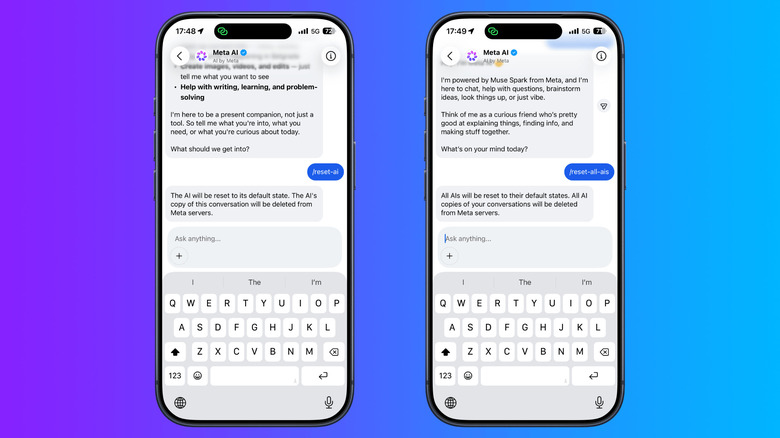
There are two commands available in Instagram AI chats to clear saved context. Use /reset-ai to delete the AI’s memory of the conversation and its saved details, or /reset-all-ais to clear all AI chats within the app. Your visible chat remains until you delete it separately. These commands only erase saved context and do not opt you out of advertising, standard data collection, or model training.
Model training occurs independently from personalization efforts. Meta leverages public posts and comments from adult accounts, along with AI interactions, to enhance its generative AI models in regions where it operates under legitimate interests. Users in the EU and UK have the option to object through Meta’s Privacy Center, but this right does not apply universally across Instagram settings.
Avoid sharing personal information, such as names, addresses, financial details, or medical data, in a Meta AI chat. Use the reset commands after conversations you don’t want the AI to retain, and utilize the objection form when available.



 Brandon Fletcher