David Bridges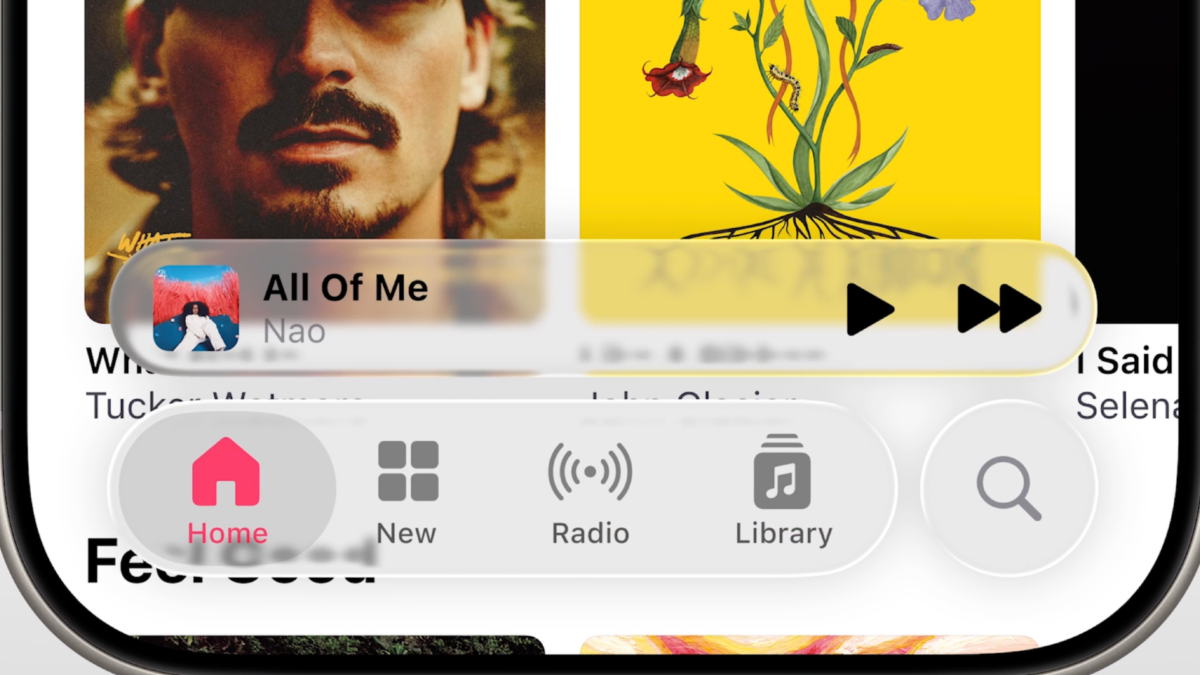

It’s official: Apple has launched its groundbreaking software redesign, drastically changing the visual experience on all your devices. At WWDC 2025, Apple introduced “Liquid Glass,” a term that encapsulates the exciting transformation taking place. This major visual overhaul impacts the user interface (UI) across a multitude of Apple devices, including your beloved iPhone, MacBook, Apple Watch, and even the Apple TV 4K streaming box. The shift is not just cosmetic; it’s a bold move towards a more engaging visual identity that Apple hopes will resonate with users.
Among all the devices affected, iOS is set to steal the spotlight, and rightly so. With millions of Americans relying on their iPhones, even the slightest alteration to the user interface can have widespread implications. Initial observations indicate that iOS is the platform most significantly transformed by this redesign. The excitement is palpable as users await the new look:
Today, we’re announcing our most beautiful software design change yet with Liquid Glass. And for the very first time, it’s coming to iOS 26, iPadOS 26, macOS 26, watchOS 26, and tvOS 26 at once! pic.twitter.com/p8pr8o1EmM
— Greg Joswiak (@gregjoz) June 9, 2025
While Apple has not directly stated it, the redesign appears to take significant inspiration from a visual design trend known as glassmorphism. This style is characterized by the use of opaque menus and adds depth to icons that previously appeared flat. In contrast to the current neumorphic design, which emphasizes minimalism, glassmorphism brings a dynamic flair to the UI. For a comparative look, one could examine other operating systems, like those from Microsoft, to see how glassmorphism might be visually represented. Although I may not be an expert in design, my perspective on Liquid Glass is clear: it’s a risk worth taking.
On one hand, this risk is exhilarating. Apple’s user interface was long overdue for an update. According to Apple’s own timeline, the last significant visual redesign occurred during iOS 7, back when iPhones featured a physical home button and major political discussions revolved around Obamacare. Additionally, Apple has faced substantial criticism in recent years for not pushing creative boundaries as it did during the tenure of Steve Jobs and Jony Ive. Taking bold steps towards innovation demonstrates a commitment to exploring new frontiers in design, and this redesign certainly alters key elements of the iPhone UI—icons, menus, and more.
However, with any adventurous initiative, there are trade-offs to consider. A significant concern with this redesign is accessibility. Many users have already pointed out potential visual challenges associated with Apple’s glassmorphic approach, raising questions about legibility and usability.
Say fucking goodbye to accessibility #WWDC25 pic.twitter.com/CKCIwv2sns
— Ilya · イリア (@ilyamiskov) June 9, 2025
Although I appreciate the aesthetic appeal of Apple’s new Liquid Glass redesign, I anticipate that there will be significant backlash from users, and I can understand their concerns. While the concept of transparent windows may seem futuristic, when this design interacts with text, it can lead to confusion and visual clutter. At times, the resulting menus may appear visually muddled, creating conflicts with other page elements. I’m reserving judgment until I can personally experience the redesign and evaluate how it performs within web pages and applications. However, it’s evident that the contrast in this new design is less pronounced compared to previous iterations.
apple just introduced “Liquid Glass” design in iOS.
it’s beautiful, futuristic… and completely unreadable.
what are we doing here? 😵💫 pic.twitter.com/ybw8SIxtqh
— Kalash (@amikalash) June 9, 2025
In my view, the current design presents a visual challenge. However, a video showcasing the same demonstration highlights that minor adjustments in menu placement can significantly enhance clarity. Here’s a screenshot from the video, illustrating this point:
There appears to be a noticeable difference in readability in this comparison. While it’s not perfect, and I wouldn’t label it fully accessible, the visual clarity is improved. This underscores the importance of design nuances that can determine whether you experience a clear, aesthetically pleasing interface or a confusing glassmorphic jumble. It seems that different styles of Liquid Glass may be available, potentially impacting the accessibility of menus. Moreover, since the official launch isn’t slated until the fall, there’s plenty of time for changes and optimizations to be made.
Opinions on Liquid Glass are bound to vary, but one undeniable fact stands out: this redesign represents a significant gamble by Apple. By risking accessibility and legibility on such a vast platform like iOS, Apple demonstrates a level of ambition that could redefine user experiences—whether for better or worse. Let’s hope that the vision, for the sake of all iPhone users, doesn’t end up being as unclear or illegible as some of the early impressions suggest.


 Daniel Mercer
 Ethan Carter