David Bridges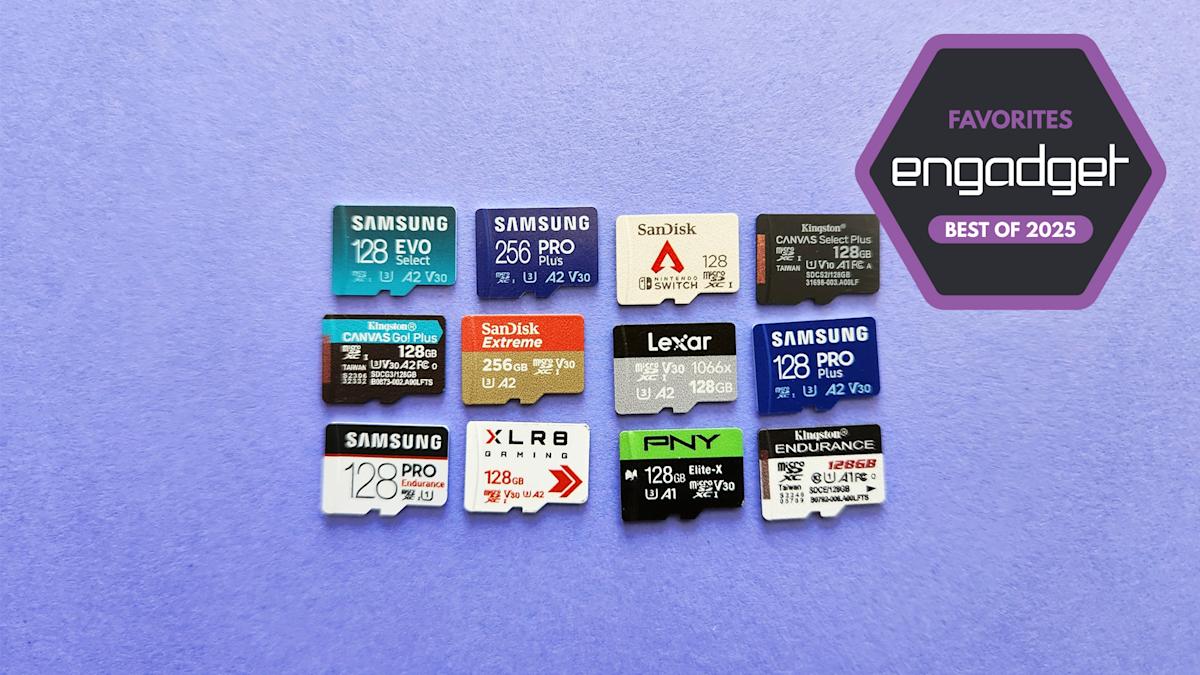

Key Takeaways
- Speed: The Lexar Professional Silver Plus offers the fastest sequential read/write performance among UHS-I cards tested.
- Warranty: Lexar backs their card with a lifetime limited warranty, adding reassurance for users.
- Capacity Options: The card is available in sizes ranging from 128GB to 1TB, catering to various storage needs.
- Price Point: The Lexar Silver Plus is competitively priced, making it an affordable choice for high performance.
Most microSD cards are fast enough for stashing photos, recording video and transferring files, but some will get you a little more bang for your buck than others. If you’re looking to boost the storage of your Nintendo Switch 2, Steam Deck, GoPro or any other device that still accepts microSD cards, we can help. We’ve thoroughly researched the market and several cards through a suite of benchmark tests: Here are the best that we’ve tested, along with some general advice on what to look for when buying a new card.
Table of contents
Best microSD cards of 2025
Lexar
Storage capacity: 128GB, 256GB, 512GB, 1TB | Speed classes: U3, V30, A2, Class 10 | Warranty: Lifetime limited
A good UHS-I card is quick enough for most people’s needs, and the Lexar Professional Silver Plus is the best value of the ones we’ve tested. Paired with Lexar’s USB card reader, it consistently delivered faster sequential reads and writes than any other UHS-I model across our benchmark tests. It’s rated for read speeds up to 205 MB/s and write speeds up to 150 MB/s, both of which are relatively high to begin with, but we found the latter to reach into the 180-190 MB/s range in synthetic benchmarks like CrystalDiskMark, ATTO and AJA.
Our 12GB test folder wrote to the card in 76 seconds on average, which was roughly 30 seconds quicker than the Samsung Pro Plus and Samsung Pro Ultimate, our two previous top picks. It effectively tied the Pro Ultimate to lead all UHS-I cards we’ve tried in reading that test file back to our PC. (That one averaged about 67 seconds, if you’re keeping score at home.) Both Samsung cards and a few others beat the Silver Plus in some random performance benchmarks, though it was still plenty competitive in that regard. Either way, it has all the requisite ratings — U3, V30, A2 — and it’s more than speedy enough for working with 4K videos or moving files between devices without major delays (so long as you have a reader and/or host device that can enable those max speeds).
The card itself is waterproof with an IPX7 rating, and Lexar backs it with a lifetime warranty. Sizes range from 128GB to a spacious 1TB. The optional reader — which you can buy separately or as part of a bundle — is a bit large, but it conveniently includes both USB-A and USB-C ports, so you shouldn’t need any dongles to connect it to a phone or PC.
What puts the Silver Plus over the top is its price. At the time of writing, a 128GB model is available for $15, while the 256GB, 512GB and 1TB variants were going for about $23, $40 and $80, respectively. Those aren’t the cheapest prices we’ve ever seen, and the math will change a bit if you need to factor in a card reader, but they either undercut or match competitors like the Pro Plus, Pro Ultimate or SanDisk Extreme despite the Silver Plus being the more performant card overall. So, to recap: It’s fast, it’s durable and it’s reasonably affordable. That’s the recipe for an easy recommendation.
- Fastest sequential read/write performance of any UHS-I card we’ve tested
- Cheaper than many slower alternatives
- Has a 1TB option
- Lifetime limited warranty
- Needs USB reader to reach maximum speeds (as expected)
$40 at Amazon (512GB)
Photo by Jeff Dunn / Engadget
Storage capacity: 128GB, 256GB, 512GB, 1TB | Speed classes: U3, V30, A2, Class 10 | Warranty: 10-year limited
Storage prices tend to fluctuate, however, and the Samsung Pro Plus — our former “best for most” pick — is still worth considering if you see it available for several dollars less than the Silver Plus in the capacity you want. Its sequential read and (especially) write performance was slower than Lexar’s card across the board but still on par with or better than nearly every other UHS-I card we’ve tested. Its random reads and writes were generally second to the pricier Samsung Pro Ultimate, but only by a little, so it’s well-suited for a portable game console or any other setup where it’d be asked to access tiny bits of data scattered throughout a device. It’s held up perfectly fine in our long-term testing as well. That said, the Silver Plus is the better card when it’s in the same price range, plus Samsung’s has a shorter 10-year warranty.
If you do end up grabbing one, though, make sure you get the newest model with read speeds rated at 180MB/s. An older-generation model with slower sequential reads and random performance may still be hanging around at some online retailers, so avoid that one. Samsung also sells Sonic the Hedgehog-themed versions of the Pro Plus with identical performance ratings, but those usually cost a few bucks extra.
- Quick sequential and random speeds
- Readily available at trusted retailers
- Has a 1TB option
- Slower than our top pick, especially with sequential write performance
- 10-year warranty isn’t the longest
$17 at Amazon
Photo by Jeff Dunn / Engadget
Storage capacity: 64GB, 128GB, 256GB, 512GB, 1TB (“new generation” model only) | Speed classes: U3, V30, A2, Class 10 / (64GB) U1, V10, A1, Class 10 | Warranty: 10-year limited
The Samsung Evo Select is a clear step behind our top picks, particularly when it comes to sequential write speeds (just under 70 MB/s on CrystalDiskMark). So we don’t recommend it for any sort of camera. Still, it’s perfectly usable for simple storage expansion, and its sequential and random read speeds were still respectable in our benchmarks.
Most importantly, it’s usually inexpensive: We’ve previously seen the 128GB, 256GB, 512GB and 1TB models fall as low as $13, $18, $33 and $67, respectively. The latter two capacities could be particularly fine values if you just want a giant chunk of space from a reputable brand on the cheap. That said, you should still grab the Lexar Professional Silver Plus or Samsung Pro Plus instead if either one is anywhere close in price.
- Often discounted
- Acceptable performance if price is chief concern
- Has a 1TB option
- Slower than other top picks, particularly in sequential write and random performance benchmarks
- 10-year warranty isn’t the longest
$13 at Amazon
Best microSD Express cards for the Nintendo Switch 2
Read our full guide to the best microSD Express cards for the Nintendo Switch 2
Let’s be clear about this: Unless you plan to own a Nintendo Switch 2 in the near future, you do not need a high-speed microSD Express card just yet. Nintendo’s gaming handheld is the only popular device that natively supports this standard right now, and microSD Express cards themselves are highly expensive compared to more traditional options.
Still, if you do want to increase a Switch 2’s storage, they’re your only choice. Fortunately, determining exactly which model to buy for the console is pretty straightforward: Get whichever one you can find in stock, in the capacity you want, at a price you can stomach.
We benchmarked several microSD Express cards for a separate Switch 2 guide, and for the most part, the performance differences between them weren’t great enough to justify paying much extra for any particular model. Loading times weren’t quite identical with every test we ran, but the cards were extremely close in most games. When there was a gap — fast-traveling to a particularly resource-heavy region in Cyberpunk 2077, for instance — the gulf between the slowest and fastest card was only ever about 3 seconds at most. That’s not nothing, but it’s not something you’re likely to fret over unless you have a stopwatch handy.
The SanDisk microSD Express Card and Lexar Play Pro.
(Jeff Dunn for Engadget)
The only time you’d notice a major speed difference is if you transfer games to your Express card from the Switch 2’s internal storage (and vice versa). In that case, the SanDisk microSD Express Card and Lexar Play Pro were generally the quickest, while PNY’s microSD Express Flash Memory Card had particularly slow write speeds.
Moving Mario Kart World to the SanDisk and Lexar models, for example, took around four minutes and 35 seconds on average; with the PNY card, it took a little over seven minutes. That said, the PNY model was the fastest when it came to moving games back to the system storage. Either way, most people aren’t constantly shuffling their games back and forth like this. Performance in actual games is more important, and in that regard the results were consistently much tighter.
What matters most is getting the most space for your budget. Unfortunately, stock for all microSD Express cards has been spotty since the Switch 2’s launch. For your convenience, we’ll list out all of the models we’ve seen at retailers thus far and their respective list prices below. The only one we haven’t tested is the Walmart Onn model, which happens to be the most affordable (but has also been out of stock for much of the past several months). Note that some lower-capacity versions — the 128GB SanDisk card, for one — advertise slower speeds than their more spacious counterparts.
-
SanDisk microSD Express Card: 128GB ($60), 256GB ($73), 512GB ($125)
-
Lexar Play Pro: 256GB ($60), 512GB ($120), 1TB ($220)
-
PNY microSD Express Flash Memory Card: 128GB ($47), 256GB ($63), 512GB ($120)
-
Samsung microSD Express Card for Nintendo Switch 2: 256GB ($60)
-
GameStop Express microSD Card for Nintendo Switch 2: 256GB ($60), 512GB ($100), 1TB ($190)
-
Walmart Onn microSDXC Express Card: 256GB ($36), 512GB ($66)
The Lexar Play Pro on top of Lexar’s RW540 microSD Express card reader.
(Jeff Dunn for Engadget)
Broadly speaking, we recommend getting at least 256GB of storage, as Switch 2 games tend to have much larger file sizes than games for Nintendo’s previous handheld. But we also recommend holding off upgrading for as long as you can, if only because all of these cards should (tariff shenanigans aside) come down in price as time goes on.
There’s no point in buying a microSD Express card for anything besides the Switch 2, but we did run the models above through our usual PC benchmarks as well. Unsurprisingly, they are miles faster than any traditional card on the market.
With the 256GB SanDisk card, for instance, sequential read speeds checked in just under 900 MB/s in CrystalDiskMark and ATTO, while sequential writes topped out around 650 MB/s. Sustained writes speeds were slower (around 210 MB/s), but that was still fast enough to move our 12GB test file to the card in 52 seconds on average. It took a mere 20 seconds to read the file back to our PC. The write test with our smaller 1.15GB test folder, meanwhile, averaged just 4.5 seconds.
It all adds up to performance that’s at least twice as fast as the best UHS-I models we’ve tested in terms of sequential reads and writes, with three or four times the speeds in some cases. The gulf in random reads and writes is similar, and in some benchmarks even greater. But you need a pricey SD card reader to even see those increases on a PC, so only those with a Switch 2 in hand or serious cash to burn should consider one of these things.
Other notable microSD cards
Samsung Pro Ultimate
The Samsung Pro Ultimate was the closest competitor to the Lexar Professional Silver Plus across our benchmark tests, but it’s tangibly worse in terms of sequential write speeds, typically costs more and doesn’t offer a 1TB option. The Samsung Pro Plus is a bit slower for sequential reads, but it’s close enough otherwise and usually easier to find at a lower price.
Lexar Professional Gold
We haven’t used it ourselves, but if you’re willing to pay for a more powerful UHS-II card built for heavy-duty video recording, the Lexar Professional Gold has tested well elsewhere and should deliver significantly faster sequential write speeds than our UHS-I picks above. It’s one of the few UHS-II cards we could actually find in stock, but it’s pricey, with a 128GB model normally priced in the $35 to $40 range.
SanDisk Extreme
The SanDisk Extreme effectively matched the Pro Plus in a few of our sequential tests, but that was partly due to us only being able to secure the 256GB model, which is higher-rated than the 128GB version. It’s a fine choice if you see it on sale at a reputable seller, but it’s broadly slower than our top pick and often costs more.
SanDisk GamePlay
The SanDisk GamePlay performs similarly to the SanDisk Extreme but costs a good bit extra as of our latest update. We couldn’t get it to reach its advertised speeds with the company’s own “Pro” card reader or other third-party options, so it fell short of our top picks.
SanDisk Pokémon
The SanDisk Pokémon does outperform its advertised read and write speeds, but not by enough to outpace the Lexar Silver Plus or Samsung Pro Plus. It essentially charges extra for having a picture of Pikachu (or Gengar, or Snorlax) on a product you’ll never look at.
SanDisk Extreme Pro
The SanDisk Extreme Pro is a close analog to the Samsung Pro Ultimate but, as of this writing, is either unavailable at most trusted retailers or priced too high by comparison. The Lexar Professional Silver Plus has faster sequential write speeds as well.
PNY XLR8 Gaming
The PNY XLR8 is an affordable card that comes with up to 512GB of space. Its sequential and random writes speeds checked in a little bit above those of Samsung’s Evo Select, plus it comes with a lifetime warranty. But its sequential reads were much, much slower, putting it out of contention.
PNY Elite-X
The PNY Elite-X often goes for cheap and wasn’t too far off the random read/write performance of Samsung’s Pro Plus in CrystalDiskMark. Like the XLR8, it’s also slightly above the Evo Select in write speeds. But its sequential reads were too far behind all of our top picks, and it no longer appears to be available in capacities above 256GB.
What to look for in a microSD card
Capacity
The first thing to figure out when buying a microSD card is how much storage space you need. Modern cards are commonly available in sizes ranging from 32GB to 512GB, with several models now available in 1TB or 1.5TB capacities as well. The first 2TB cards from major brands have started to arrive as well, which is exciting, but those are still fairly rare (and very expensive) by comparison.
For many, a 128GB or 256GB model should be a sweet spot between price and storage space. But if you need more room — say, for stashing a bunch of games on a Steam Deck — a 512GB card or greater could make more sense and often provides a better cost-per-GB ratio. These days, you can find a decent 128GB card for around $15, a good 256GB card for less than $30 and a solid 512GB card for around $40 (with faster models priced a little higher). There’s a starker increase when you go up to 1TB cards, which often cost closer to $100, though we’ve seen some fall into the $70 to $80 range more frequently over the last year. The first 2TB cards are a bigger leap: the 2TB SanDisk Extreme, for example, now has a list price around $200, which is down a bit from its original MSRP but still far from cheap.
Note that a microSD card’s performance may differ depending on what capacity you buy. SanDisk says its 128GB Extreme card delivers sequential write speeds up to 90 MB/s, for example, while the higher-capacity models in the same line offer up to 130 MB/s.
When we talk about microSD cards today, we generally refer to cards that use the microSDXC (eXtended Capacity) standard, which have a capacity between 32GB and 2TB. Your device needs to support this for it to work with a microSDXC card. This will almost never be an issue these days, but some older devices (a Nintendo 3DS, for instance) are only compatible with microSDHC (High Capacity) cards, which range from 2GB to 32GB.
Read and write speeds
MicroSD cards are primarily judged on their read and write speeds, which are usually measured in megabytes per second (MB/s). Generally, most microSD cards have faster read speeds than write speeds.
These metrics can then be broken down into sequential and random performance. Sequential read and write speeds matter when you’re trying to access (read) or save (write) long, constant streams of data, such as opening a large video or copying a big batch of files from a PC. If you want to use a microSD card for media storage, this is particularly important. Random performance, meanwhile, is about how quickly a card can read and write small files scattered throughout the device.
Since random read/write speeds are much lower than sequential ones, storage device makers tend not to advertise them as loudly. But they’re important if you use a card with a gaming device or a single-board computer like the Raspberry Pi, where it often has to rapidly save and access small bits of data in random locations.


 Daniel Mercer
 Brandon Fletcher