David Bridges

Instagram allows you to let others know that you’re currently using the platform. However, you can also choose to stay low-key and not let others know what you’re up to. For that, you have to learn how to turn off “Active Status” on Instagram on Android, iOS, and PC.
The process is really simple and after that, the green dot appearing with your name on other users’ screens will disappear and they won’t know that you are currently active. You can also disable the “In the chat” prompt on Instagram.
How to Turn off Active Status on Instagram on Android/iOS?
The procedure to turn off Active Status on Instagram is the same on the Android and iOS versions of the app. Follow these steps on either of the devices:
- Launch the Instagram app and tap on your profile icon at the bottom.
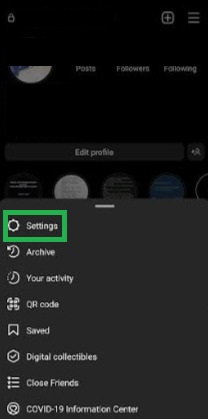
- Now tap on the three lines present in the top right section.
- Next, tap on “Settings.”
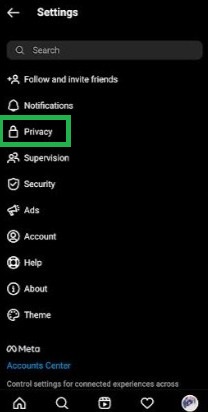
- Next, tap on “Privacy.”
- After that, find and tap on “Activity Status.”
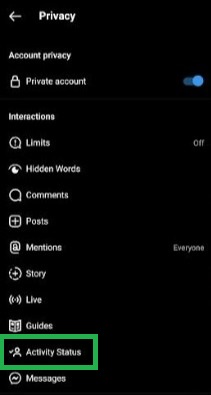
- Finally, turn the toggle for “Show Activity Status” to the off position.

That’s it. After that, you can use Instagram secretly and your friends won’t know that you’re online. You can watch Reels and Stories without anyone troubling you unless Instagram stops working.
How to Turn Off Active Status on Instagram on PC?
If you are fond of using Instagram on your computer and don’t like people nudging you in the DMs when you are online, you can turn off your Activity Status on the website. Follow these steps:
- Go to the Instagram website in a browser and log in to your account.
- Now click on your profile icon from the top-right section.
- Next, click on “Settings” from the drop-down menu.
- Next, click on “Privacy and Security” from the panel on the left.
- Here, find the “Show Activity Status” option and uncheck the box present beside it.
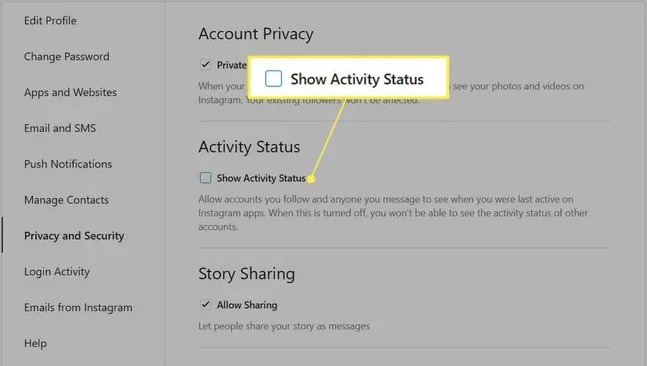
That’s it. After doing this, other Instagram users won’t know that you are active when you are using the platform on your PC, mobile, or any other device.
How to Disable the “In the Chat” Prompt on Instagram?
Instagram has added another new option that tells your friends when you two are in the chat at the same time. When you open someone’s chat on Instagram and the person has also opened the chat at that time, the status above changes to “In the chat.”
However, you can disable this feature, so the others won’t know that you are active in their chat. They’ll only see you as “online” if your Activity Status is turned on.
Follow these steps:
- Launch the Instagram app and tap on the profile icon.
- Now tap on the three bars present in the top-right section.
- Next, tap on Settings.
- Next, tap on “Privacy.”
- After that, tap on “Activity Status.”
- Here, you’ll see an option saying “Show When You’re Active Together.”
- Finally, turn its toggle off.

That’s it. You can undo the change whenever you’d like using similar steps.
Feel free to use the comment box if you have any queries or doubts about anything mentioned above.



 Maya Kensington
 Troy Sanders